Amazon Fire TV Stick 4K Explained: Setup, Features & Tricks You Can’t Miss
Unlock the full potential of your Amazon Fire TV Stick 4K! Learn easy setup steps, explore top features, and discover tricks you won’t want to miss.

Amazon Fire TV Stick 4K
The Complete Consumer Guide — What It Is, How It Works & Everything In Between
| ⚡ Quick Answer The Amazon Fire TV Stick 4K is a compact HDMI dongle that plugs into any TV and turns it into a full smart TV. It streams 4K Ultra HD content from Netflix, Prime Video, Disney+, and 30,000+ apps via Wi-Fi. No cable box needed — just a TV with an HDMI port, a Wi-Fi connection, and an Amazon account. |
1. What Is the Amazon Fire TV Stick 4K?
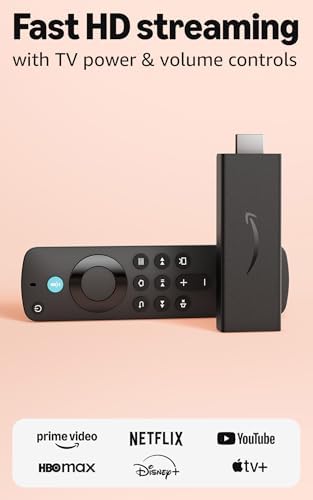
The Amazon Fire TV Stick 4K is a streaming media player developed by Amazon. It is a small, thumb-sized device that connects to your television via an HDMI port, transforming any screen into a smart entertainment hub. Unlike traditional cable boxes that are tied to broadcast schedules and hardware rental fees, the Firestick 4K gives you on-demand access to films, TV shows, live events, sports, music, and games — all delivered over the internet.
First launched in 2018 and now in its second generation (released 2023 and later renamed the Fire TV Stick 4K Plus in 2025), the device runs Amazon’s Fire OS — a customised version of Android — and includes the Alexa Voice Remote for hands-free searching and smart home control. It is one of the most popular streaming sticks in the world, widely regarded as a benchmark product in its category.
The current Fire TV Stick 4K lineup includes four main models:
- Fire TV Stick HD — Entry-level full-HD model, ideal for basic streaming.
- Fire TV Stick 4K Plus (formerly 4K 2nd Gen) — The best-selling mid-range 4K stick with Wi-Fi 6.
- Fire TV Stick 4K Max (2nd Gen) — Amazon’s most powerful stick with Wi-Fi 6E and 16GB storage.
- Fire TV Stick 4K Select (2025) — New model running Amazon’s own Vega OS with Ambient Experience.
2. How Does It Work?
The Fire TV Stick 4K works by connecting your television to the internet and providing a navigable interface to access streaming content. Here is a step-by-step breakdown of the process:
2a. Hardware at a Glance
The stick contains a quad-core processor (MediaTek), 2GB of RAM, and either 8GB or 16GB of internal storage depending on the model. A dedicated GPU handles smooth graphics and video rendering. The device connects to your home Wi-Fi network and communicates with Amazon’s cloud servers and third-party app servers to stream content.
2b. The Interface
Once powered on, you are greeted by the Fire TV home screen — a curated dashboard showing personalised recommendations, your recently watched content, and easy access to all installed apps. Navigation is handled via the included Alexa Voice Remote or through the free Fire TV app on your smartphone.
2c. Streaming Explained
When you select a title to watch, the Fire TV Stick 4K fetches compressed video data from the content provider’s servers (e.g., Netflix or Prime Video) via your broadband connection. This data is decoded by the device’s hardware and displayed on your TV in real time. The Firestick 4K supports the AV1 codec — a next-generation format that delivers better picture quality at lower bandwidth compared to older codecs like H.264.
2d. Voice & Alexa Integration
Pressing the microphone button on the remote activates Alexa. You can speak naturally — for example, ‘Show me action movies from the 1990s’ or ‘Play Bridgerton on Netflix’ — and the device responds instantly. Alexa can also control smart home devices such as Philips Hue lights, Ring doorbells, and compatible thermostats directly from the Fire TV interface.
2e. Technical Specs Summary
| Feature | Fire TV Stick 4K Plus | Fire TV Stick 4K Max (2nd Gen) |
| Processor | MediaTek Quad-Core | MediaTek 2.0 GHz Quad-Core |
| RAM | 2 GB | 2 GB |
| Storage | 8 GB | 16 GB |
| Wi-Fi | Wi-Fi 6 (802.11ax) | Wi-Fi 6E (802.11ax) |
| Resolution | 4K Ultra HD | 4K Ultra HD |
| HDR Support | Dolby Vision, HDR10, HDR10+, HLG | Dolby Vision, HDR10, HDR10+, HLG |
| Audio | Dolby Atmos, 5.1 Surround | Dolby Atmos, 5.1 Surround |
| AV1 Codec | Yes (Hardware Decoded) | Yes (Hardware Decoded) |
| Ambient Experience | No | Yes |
| USB Power | Micro USB | USB-C |
| Retail Price (US) | ~$49.99 | ~$59.99 |
Bestseller #1

3. Installation: How to Set Up the Firestick 4K
Setting up the Amazon Fire TV Stick 4K is straightforward and typically takes 10–20 minutes. Follow these steps:
Step 1 — Connect to Your TV
Plug the Firestick 4K into an available HDMI port on your television. If the space behind your TV is tight, use the included HDMI extender cable to give the stick a bit more clearance and improve Wi-Fi signal reception.
Step 2 — Power the Device
Connect the USB power cable to the stick and plug the power adapter into a wall socket. Avoid powering the Firestick from your TV’s USB port if possible — TV USB ports often do not deliver sufficient power, which can cause instability or slow performance.
Step 3 — Select the Correct Input
Switch your TV to the HDMI input where the Firestick is connected. You should see the Amazon Fire TV setup screen appear.
Step 4 — Pair the Remote
The Alexa Voice Remote pairs automatically with the device when you first power it on. Hold the Home button for 10 seconds if the remote does not pair automatically.
Step 5 — Connect to Wi-Fi
Select your home Wi-Fi network and enter your password. For the best 4K streaming experience, a broadband connection of at least 15–25 Mbps is recommended. The Fire TV Stick 4K Max’s Wi-Fi 6E support is particularly beneficial in busy households with many connected devices.
Step 6 — Sign In to Your Amazon Account
Log in using your existing Amazon account. If you registered the device on Amazon before delivery, it may already be linked to your account — a big time-saver. If you do not have an Amazon account, you can create one for free.
Step 7 — Complete Software Updates
The device will check for and install any pending software updates. This may take several minutes on first setup. Allow it to complete — skipping updates can cause app crashes and performance issues.
Step 8 — Customise Your Home Screen
Once the home screen loads, you can download your preferred apps from the Amazon Appstore, arrange your favourites, and configure Alexa preferences. You are now ready to stream.
4. Equipment Required
To use the Amazon Fire TV Stick 4K, you will need the following:
| Equipment | Requirement | Notes |
| Television | Any TV with HDMI port | 4K UHD TV needed for 4K content; works on HD TVs too |
| Internet Connection | Broadband Wi-Fi | Min. 15 Mbps for HD; 25 Mbps for 4K streaming |
| Wi-Fi Router | 802.11 a/b/g/n/ac or newer | Wi-Fi 6 router recommended for 4K Max model |
| Power Outlet | Standard wall socket | USB power adapter included; avoid TV USB ports |
| Amazon Account | Free to create | Required for device setup and app downloads |
| HDMI Port | HDMI 2.0 recommended for 4K | Extender cable included in the box |
| Streaming Subscriptions | Optional | Some content is free; paid apps require subscriptions |
| Bluetooth Controller | Optional | For cloud gaming via Xbox Game Pass or Amazon Luna |
The Firestick itself comes in the box with the device, HDMI extender cable, USB power cable, USB power adapter, Alexa Voice Remote (with batteries), and a quick-start guide.
5. Programs & Apps Available
The Amazon Fire TV Stick 4K provides access to one of the largest app ecosystems of any streaming stick. The Amazon Appstore carries over 30,000 apps and channels. Below is a breakdown by category:
5a. Premium Subscription Streaming
- Netflix — Films, series, documentaries, and Netflix Originals.
- Amazon Prime Video — Included with Amazon Prime membership; extensive originals library.
- Disney+ — Disney, Marvel, Star Wars, Pixar, and National Geographic content.
- Max (HBO Max) — HBO dramas, Warner Bros. films, and Discovery content.
- Apple TV+ — Apple Originals including Severance, Silo, and Slow Horses.
- Paramount+ — CBS, Nickelodeon, Showtime, MTV, and live CBS programming.
- Peacock — NBC Universal content, live sports including NFL, Premier League, and Olympics.
- STARZ — Premium movies and original series like Outlander and Power.
5b. Free Streaming (Ad-Supported)
- Tubi — Over 275,000 free titles; no account required.
- Pluto TV — 300+ live FAST channels and an on-demand library at no cost.
- Prime Video (Free Tier) — Select free content available without a paid subscription.
- YouTube — Full access to YouTube’s video library, including YouTube Originals.
- Amazon Freevee — Free films and series with adverts, integrated into Prime Video.
- Plex — Access your personal media library plus free on-demand content.
5c. Live TV & Sports
- YouTube TV — Live channels from ABC, CBS, ESPN, Fox, NBC, and more.
- Hulu + Live TV — Live broadcast and cable channels bundled with Hulu’s on-demand library.
- Sling TV — Flexible live TV packages starting at lower price points than full bundles.
- FuboTV — Sports-focused live TV with NFL, NBA, MLB, soccer leagues, and 4K events.
- ESPN — Standalone streaming service (launched August 2025) with 47,000+ live events annually.
- DAZN — International sports, combat sports, and boxing.
5d. Music Streaming
- Amazon Music — Included with Prime; Unlimited tier offers 100 million songs.
- Spotify — Full Spotify app with access to podcasts, playlists, and music.
- Apple Music — Available via the Fire TV Appstore.
- Tidal — High-fidelity audio streaming for audiophiles.
5e. Cloud Gaming
- Xbox Game Pass (Cloud Gaming) — Stream hundreds of games including Call of Duty: Black Ops 7, Hogwarts Legacy, and Ninja Gaiden 4. No console required; a compatible controller is needed.
- Amazon Luna — Amazon’s own cloud gaming service; Prime members get access to 25+ party games.
5f. Smart Home & Utilities
- Ring — View live camera feeds from your Ring doorbell directly on your TV.
- Alexa Smart Home — Control lights, thermostats, locks, and more.
- Silk Browser — Full web browsing capability on your TV.
- Downloader — Popular sideloading utility for installing apps not in the Appstore.
Bestseller #1

Bestseller #2

Bestseller #3

6. Subscription Charges
The Fire TV Stick 4K itself is a one-time hardware purchase. However, most premium content requires ongoing subscription fees. Here is a breakdown of the key services:
6a. Device Cost (One-Time Purchase)
| Model | US Price (RRP) | UK Price (RRP) |
| Fire TV Stick HD | ~$35 | ~£34.99 |
| Fire TV Stick 4K Plus | ~$49.99 | ~£49.99 |
| Fire TV Stick 4K Select | ~$40 | ~£39.99 |
| Fire TV Stick 4K Max (2nd Gen) | ~$59.99 | ~£59.99 |
| Fire TV Cube (3rd Gen) | ~$139.99 | ~£134.99 |
Prices frequently drop during Amazon Prime Day, Black Friday, and Cyber Monday sales — often by 30–50%.
6b. Streaming Service Subscription Fees (US Pricing, April 2026)
| Service | Monthly Price | Annual Option | Free Tier? |
| Amazon Prime (includes video) | $14.99/mo | $139/yr | No (30-day trial) |
| Prime Video (standalone) | $8.99/mo | N/A | No |
| Netflix (Standard w/Ads) | $7.99/mo | N/A | No |
| Netflix (Standard) | $17.99/mo | N/A | No |
| Netflix (Premium 4K) | $24.99/mo | N/A | No |
| Disney+ | $7.99/mo (w/ads) | $79.99/yr | No |
| Max (HBO, with ads) | $9.99/mo | ~$99.99/yr | No |
| Apple TV+ | $12.99/mo | N/A | No (7-day trial) |
| Paramount+ | $8.99/mo (w/ads) | $89.99/yr | No |
| Peacock (Premium) | $7.99/mo | $79.99/yr | Yes (basic) |
| ESPN (Select) | $12.99/mo | N/A | No |
| ESPN (Unlimited) | $29.99/mo | N/A | No |
| YouTube TV | ~$72.99/mo | N/A | No |
| Xbox Game Pass (Standard) | $14.99/mo | N/A | No |
| Tubi / Pluto TV / Freevee | Free | Free | Yes (ad-supported) |
Note: Alexa+ (Amazon’s premium AI assistant) is included free with Amazon Prime. Non-Prime users can subscribe to Alexa+ for $19.99/month. Alexa+ is currently limited to US-based Amazon accounts set to US English.
7. Country Availability & Restrictions
7a. Where Is the Firestick 4K Available to Buy?
Amazon officially sells Fire TV Stick devices in numerous markets, including the United States, United Kingdom, Canada, Germany, France, Japan, India, Italy, Spain, Mexico, Australia, and Brazil, among others. Both domestic-version and international-version devices are available on Amazon. Physical retail availability (e.g., Best Buy, Walmart, Target) is primarily in the US, Canada, and the UK.
An ‘International Version’ of the Fire TV Stick 4K Max is sold on Amazon to buyers in regions where the device is not officially distributed, though a separate power adapter may be required depending on the destination country’s plug standards.
7b. Content Restrictions by Country
While the Fire TV Stick 4K hardware can physically be used in most countries, the content available depends heavily on your registered Amazon account region and your geographic location:
- Streaming libraries vary by region — Netflix, Prime Video, Disney+, and other services have different content catalogues in different countries due to licensing agreements.
- Some apps are not available in certain app stores — For example, BBC iPlayer is only available in the UK Amazon Appstore.
- VoIP apps (Skype, WhatsApp, Zoom) may be blocked at a government level in certain countries such as the UAE.
- Alexa+ is currently restricted to US-based Amazon accounts set to US English.
- Alexa voice search is optimised for English or Spanish, though other languages may be supported depending on the country.
7c. Using a Firestick While Travelling
Amazon allows you to take a registered Fire TV Stick to another country while travelling. The device will function, but app availability and content libraries will reflect your home account’s region rather than the country you are visiting. Some features, such as live TV apps with regional broadcast rights, may not function correctly outside their home territory.
7d. VPNs and Geo-Restricted Content
Many users install VPN apps on their Firestick to access geo-restricted content — for example, accessing US Netflix from abroad or BBC iPlayer from outside the UK. Popular VPN apps such as ExpressVPN, NordVPN, and CyberGhost are available directly from the Amazon Appstore. Using a VPN may, however, violate the terms of service of certain streaming platforms, so users should review each service’s policy before doing so.
| ⚠️ Important Note on ‘Dodgy Sticks’ Pre-modified Firesticks sold with piracy-enabling software (sometimes called ‘dodgy sticks’ or ‘kodi boxes’) are illegal in many jurisdictions. In the UK, a wave of arrests occurred in late 2025 targeting sellers of such devices. Some have also been found to contain malware. Always purchase Firestick devices from authorised retailers. |
8. Bottom Line
The Amazon Fire TV Stick 4K is an outstanding value proposition for anyone looking to cut the cord or upgrade an older television. For most users, the Fire TV Stick 4K Plus at around $50 hits the sweet spot — delivering 4K, Dolby Vision, Dolby Atmos, Wi-Fi 6, and access to virtually every major streaming service in one pocket-sized package.
Power users and early adopters should consider the Fire TV Stick 4K Max, which adds Wi-Fi 6E, doubled storage, and the Fire TV Ambient Experience. Those on a tight budget can start with the Fire TV Stick HD for full-HD streaming at a lower entry price.
| Who Should Buy | Recommended Model |
| First-time streamers / Budget buyers | Fire TV Stick HD (~$35) |
| Most users wanting 4K | Fire TV Stick 4K Plus (~$49.99) |
| Power users / Wi-Fi 6E homes | Fire TV Stick 4K Max (~$59.99) |
| Those wanting a new OS experience | Fire TV Stick 4K Select (~$40) |
| Hands-free whole-home control | Fire TV Cube (~$139.99) |
— End of Article —
Disclaimer: This article contains affiliate links. If you purchase through these links, I may earn a small commission at no additional cost to you