
Are Mini PCs Good? Gaming, Value & Buying Guide (2026)
Wondering if mini PCs are worth buying? Discover the pros and cons of mini PCs, how they compare to traditional desktop computers, and whether they're the right choice for work, gaming, home entertainment, or everyday use. Find out if a mini PC offers the performance and value you need.

Are Mini PCs Good? A Straight Answer on Gaming, Value, and Where They Beat Laptops and Desktops
Introduction
A mini PC may look tiny beside a traditional desktop tower—many are small enough to fit in the palm of your hand—but don’t let the size fool you. Inside these compact machines are processors and components that rival many modern laptops, minus the screen, keyboard, and battery. The result is impressive desktop-class performance in a package that barely takes up any desk space.
Thank you for reading this post, don't forget to subscribe!That’s exactly why mini PCs have become one of the smartest computing upgrades in 2026. Whether you’re setting up a home office, building a homelab, creating a media center, replacing an aging desktop, or wondering if a compact PC can handle gaming, you’re probably asking the same question: Are mini PCs good? The short answer is yes—but the right choice depends on what you expect them to do. Yes—mini PCs are an excellent choice for most users. They deliver outstanding performance for everyday computing, office work, content creation, programming, media streaming, and homelab applications while consuming far less space and electricity than a traditional desktop tower. Thanks to the latest AMD Ryzen AI and Intel Core processors, many mini PCs now outperform similarly priced laptops and offer exceptional value for money.
For gaming, mini PCs are more capable than ever. Models equipped with modern integrated GPUs such as AMD’s Radeon 780M and Radeon 890M can comfortably run esports titles at 1080p with high settings and many AAA games at medium settings. Premium models featuring OCuLink support can even connect to a desktop-class external GPU (eGPU), delivering performance surprisingly close to a full gaming PC. However, if your primary goal is uncompromised 1440p or 4K gaming with maximum graphics settings, a traditional gaming desktop remains the better choice for pure performance per dollar.
What Exactly Is a Mini PC?
A mini PC is a fully functional desktop computer built into a chassis small enough to fit in one hand or mount directly to the back of a monitor. Instead of a full-size motherboard, power supply, and multiple expansion bays, a mini PC uses laptop-grade components — a mobile-class CPU, soldered or SO-DIMM memory, and M.2 solid-state storage — packed into a case that is typically under one liter in volume.
The category is not new. Intel effectively created the modern mini PC market in 2013 with the first NUC (Next Unit of Computing), aimed at digital signage, kiosks, and simple office terminals that needed a real Windows PC without the bulk. For most of the following decade, mini PCs stayed in that lane: low-power chips, modest graphics, and a reputation as a compromise machine for people who valued space over performance.
Why the Product Line Exists — and Why It Changed
Three separate pressures created the mini PC category and then pushed it upmarket:
- Space and power efficiency: offices, classrooms, retail displays, and home theater setups needed a real computer that could disappear behind a monitor or TV and draw a fraction of a desktop’s wattage.
- Laptop-chip spillover: as AMD and Intel packed more performance into thin-and-light laptop processors, that same silicon became available to put into a small desktop shell — with better cooling headroom than any laptop chassis allows, since a mini PC does not need to fit a keyboard, screen, or battery around the components.
- The rise of Chinese ODM brands: companies such as GMKtec, Beelink, Minisforum, and GEEKOM began building mini PCs around AMD’s Ryzen mobile chips well before larger brands did, undercutting Intel NUC-class pricing while matching or beating it on multi-core performance.
That last shift is the reason today’s mini PCs no longer feel like a compromise product. A modern mid-range mini PC can run the same silicon found in a $1,500 gaming laptop, minus the screen, battery, and keyboard, at a noticeably lower price.
One footnote worth knowing: Intel discontinued in-house NUC development in 2023 and licensed the NUC brand to Asus, which now builds the NUC and ROG NUC lines. That’s why a brand called “Asus” appears making a product called “NUC” later in this guide — it inherited the name and platform rather than inventing a competing one.
Are Mini PCs Good for Gaming?
The honest answer is: good, with a defined ceiling. Reviewer consensus in 2026 points to integrated-graphics performance as the deciding factor:
- AMD Radeon 780M (found in Ryzen 7 8845HS / 7840HS-class chips) is the current mainstream baseline, delivering comfortable 1080p performance at medium-to-high settings in most modern titles.
- AMD Radeon 890M (paired with the Ryzen AI 9 HX 370) sits roughly 30% ahead of the 780M and is the strongest integrated GPU widely available in mini PCs today, stretching into playable 1440p territory in some titles.
- Intel’s integrated Arc graphics on comparable mini PCs generally trail both Radeon tiers in gaming benchmarks, according to buyer-guide testing.
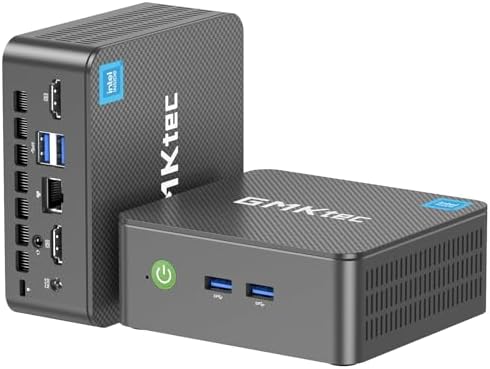
For players chasing more than integrated graphics allow, a growing number of higher-end mini PCs — the GMKtec NucBox K11 among the most discussed examples — include an OCuLink port, which carries a direct PCIe Gen4 connection to an external GPU enclosure. Independent testing comparing eGPU interfaces has consistently found OCuLink outperforming Thunderbolt by a meaningful margin — measured losses for Thunderbolt versus OCuLink have ranged from roughly 13% to 25% depending on the title and generation tested — because OCuLink exposes PCIe lanes directly instead of tunneling them through Thunderbolt’s protocol overhead. In practical terms, an OCuLink mini PC paired with a mid-range discrete GPU can reach frame rates well beyond what any integrated graphics chip offers, closing most of the gap to a small desktop tower.
Where mini PCs remain a poor fit is uncompromised 1440p or 4K gaming at high settings. Buyer guides are consistent on this point: if that is the actual goal, a conventional desktop tower with a full-size discrete GPU still offers the best price-to-performance ratio, since it isn’t paying a size-and-thermal tax for the compact chassis.
Mini PC vs. Laptop vs. Desktop
| Factor | Mini PC | Laptop | Full-Size Desktop |
| Raw performance | High for size — desktop-class sustained performance from laptop-grade chips | Throttled by thin chassis and battery constraints | Highest ceiling — full-size CPUs and discrete GPUs |
| Portability | Small and light, but not battery-powered — needs a monitor, keyboard, and mouse | Fully self-contained and battery-powered | Not portable |
| Upgradability | Limited — usually RAM/SSD only; GPU only via OCuLink/Thunderbolt eGPU | Very limited, often sealed or soldered | Fully modular — CPU, GPU, RAM, storage, PSU |
| Price-to-performance | Strong — laptop chips at lower markup than a full laptop | Pays a premium for the screen, battery, and chassis engineering | Best raw value per performance dollar |
| Power draw | Low — often 10–65W under load | Low, battery-optimized | Higher — 150–500W+ with a discrete GPU |
| Noise and footprint | Minimal — sits behind a monitor or on a shelf | Minimal | Requires a tower’s worth of desk or floor space |
| Best for | Office work, HTPC, homelab, 1080p gaming, thin-client replacement | Anyone who needs to work from anywhere | Serious gaming, video editing, workstation loads |
Pros and Cons of Mini PCs
Pros
- Desktop-class multi-core performance from a case the size of a paperback book, thanks to mobile CPUs that no longer trail their desktop counterparts as badly as they once did.
- Idle and load power draw far below a desktop tower, which matters for always-on uses like home servers, NAS front-ends, or firewalls.
- Near-silent operation in well-designed models, since the chassis and cooling only need to handle a mobile-class TDP rather than a 300W desktop GPU.
- VESA-mountable design that removes the machine from the desk entirely, mounting directly to the back of a monitor.
- A genuine upgrade path for gaming through OCuLink eGPU support, letting buyers start small and add real GPU performance later.
- Meaningfully lower entry price than an equivalently specced laptop, since the buyer isn’t paying for a screen, battery, or trackpad.
Cons
- Buyers who need serious 1440p/4K gaming or heavy GPU-bound rendering are better served by a full desktop.
- Anyone needing true portability should buy a laptop — a mini PC still requires a monitor, keyboard, and mouse wherever it goes.
- Upgrade paths stop at RAM and storage on most models; the CPU and integrated GPU are fixed for the life of the machine.
- Build quality and support vary sharply by brand — buyer guides consistently flag budget, no-name listings for thermal paste issues, BIOS problems, and slow support response.
Who Are the Proponents?
Mini PC adoption clusters around a few recurring user types, based on where the category shows up most in buying guides and community discussion:
- Home theater and media-center builders, who want a silent, low-power box that disappears behind or beside a TV.
- Homelab and self-hosting enthusiasts, running Proxmox, Plex, Home Assistant, or firewall software such as pfSense/OPNsense — a use case reviewers frequently highlight for mini PCs with dual network ports.
- Small-business and office IT buyers, replacing bulky desktop towers with VESA-mounted units for basic productivity and point-of-sale terminals.
- Budget and space-conscious gamers, particularly in shared or small living spaces, who want 1080p gaming without a full tower.
- Developers and tinkerers, drawn to ARM- and Linux-friendly mini PCs for low-power, always-on development or automation boxes.
- Digital signage and kiosk operators, the original use case the category was built around and one that still drives a meaningful share of sales.
How to Choose a Mini PC — Buying Advice
Once you know a mini PC fits your use case, the buying decision comes down to matching the chip, ports, and cooling design to what you’ll actually do with it.
Match the chip to the job
- General office work, browsing, and media playback: any current Ryzen 5/7 or Intel Core mobile chip is overkill-proof — prioritize price and port selection instead.
- 1080p gaming: look specifically for Radeon 780M or 890M integrated graphics; the CPU model matters less than which GPU tier it’s paired with.
- Homelab/self-hosting: prioritize dual 2.5GbE (or faster) network ports and RAM upgradeability over raw CPU speed — most self-hosted workloads are I/O- and RAM-bound, not CPU-bound.
- Content creation or light video editing: favor higher core-count chips (Ryzen 9 or Core Ultra 9 tier) and confirm the model supports fast NVMe storage.
Budget tiers
- Entry-level (~$200–$350): fine for browsing, office apps, and digital signage; skip integrated-GPU gaming claims from unbranded listings at this price.
- Mid-range (~$400–$650): where most Radeon 780M-class gaming and homelab picks live — the sweet spot for value-focused buyers.
- High-end (~$700–$1,200+): Radeon 890M or OCuLink-equipped gaming builds, and premium options like the Mac mini or ROG NUC with discrete-GPU configurations.
Common mistakes to avoid
- Buying an unbranded listing based on spec sheet alone — buyer guides consistently flag no-name units for thermal paste and BIOS issues that established brands rarely have.
- Assuming any mini PC can do 1440p/4K gaming — check the specific integrated GPU model, not just “gaming mini PC” marketing language.
- Overlooking RAM configuration — some models solder RAM permanently, so confirm upgradeability before buying if you expect to add memory later.
- Ignoring port selection — VESA-mount setups and homelab boxes both benefit from checking network port count/speed and display-output count before purchase, not after.
Frequently overlooked factor: warranty and support
Warranty length varies more than buyers expect among mini PC brands, and it’s a meaningful trust signal given how many budget listings exist. It’s worth checking coverage length and support responsiveness before comparing specs line by line.
Top-Rated Mini PCs by Brand (2026)
The following reflects manufacturer specifications and consensus positioning across current buyer’s guides and hands-on reviews, organized by brand rather than a single ranked list.
| Brand | Standout model | Best known for | Notable spec |
| Apple | Mac mini (M4) | Overall performance and efficiency; macOS ecosystem | Apple M4 chip; widely cited as the top overall pick across major buyer’s guides |
| GMKtec | NucBox K11 | Gaming value and OCuLink eGPU expansion | Ryzen 9 8945HS, Radeon 780M, OCuLink port, dual 2.5GbE NICs |
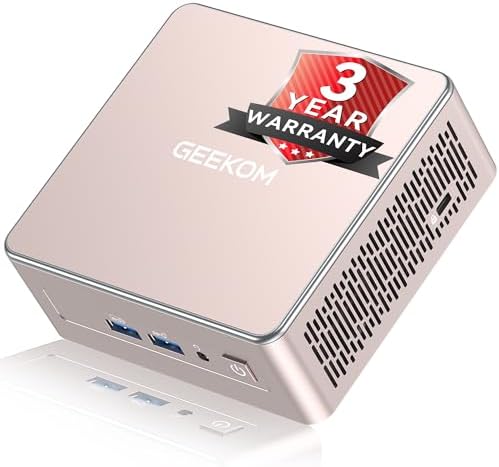
| GEEKOM | A5 / A8 | Windows productivity value and long warranty coverage | Reviewer guides note GEEKOM’s three-year warranty as a standout among mainstream brands |
| Beelink | SER9 AI | Strongest integrated-GPU gaming (no eGPU needed) | Ryzen AI 9 HX 370, Radeon 890M, XDNA NPU rated up to 50 TOPS |
| Minisforum | UM890 Pro | Best value in the Radeon 780M gaming tier | Ryzen 7 8845HS, upgradeable RAM, OCuLink for future eGPU expansion |
| Asus | ROG NUC | Premium, gaming-focused build with real discrete-GPU options | Intel Core Ultra 9 processor, up to RTX 5080 Laptop GPU, triple-fan + dual vapor chamber cooling, support for up to five 4K displays |
| AceMagic | K1 | Budget-to-mid-range everyday use | Positioned by buyer’s guides as a solid mid-range, non-gaming pick |
Note: Specifications and pricing on mini PCs change frequently and vary by region and configuration. Always confirm current specs on the manufacturer’s page before purchase.
Frequently Asked Questions
Can a mini PC replace a gaming desktop?
For 1080p gaming at medium-to-high settings, yes, particularly with a Radeon 890M-class integrated GPU or an OCuLink eGPU setup. For high-refresh 1440p or 4K gaming, a traditional desktop with a full-size discrete GPU remains the stronger price-to-performance choice.
Are mini PCs upgradeable?
Most allow RAM and SSD upgrades through accessible panels. The CPU and integrated GPU are fixed. OCuLink- or Thunderbolt-equipped models add an external GPU upgrade path that ordinary mini PCs and laptops don’t offer.
Do mini PCs run hot or loud?
It depends heavily on the model. Buyer’s guides flag thermal throttling as a common issue in poorly designed budget units, while well-reviewed models with dual-fan or vapor-chamber cooling sustain their rated power draw without significant throttling.
Which brands do reviewers trust most?
GEEKOM, Beelink, and Minisforum are the brands most consistently named as reliable across 2026 buyer’s guides, alongside GMKtec for gaming-oriented, OCuLink-equipped models. Apple’s Mac mini leads for buyers already in the macOS ecosystem. Guides generally advise avoiding unbranded listings that flood online marketplaces.
How much does a good mini PC cost?
Budget-friendly office and signage models start around $200–$350. Mid-range picks capable of 1080p gaming and homelab duty generally run $400–$650. Premium options with Radeon 890M graphics, OCuLink eGPU support, or Apple/Asus branding typically land between $700 and $1,200 or more.
Do mini PCs need a separate GPU?
No — every mini PC ships with integrated graphics capable of everyday use and 1080p gaming at the right tier (Radeon 780M or 890M). A separate GPU is only relevant if you want 1440p/4K gaming, and only on models with an OCuLink or Thunderbolt port to connect an external GPU enclosure.
Can a mini PC run Windows 11?
Yes. Current mini PCs use standard x86 mobile processors from AMD or Intel, so they run Windows 11 the same as any laptop or desktop with equivalent specs. Many also support Linux distributions well, which is part of their appeal for developers and homelab users.
Is a mini PC good for video editing or content creation?
For light-to-moderate editing, yes — a higher core-count chip such as a Ryzen 9 or Core Ultra 9 mini PC handles most consumer editing workflows well. For GPU-heavy color grading, 4K/8K timelines, or 3D rendering, a desktop with a discrete GPU still outperforms integrated-graphics mini PCs.
How much power do mini PCs use compared to a desktop?
Mini PCs typically draw 10–65W under load, versus 150–500W or more for a desktop tower running a discrete GPU. This makes them noticeably cheaper to run continuously, which matters for always-on homelab or media-server use.
Can you connect multiple monitors to a mini PC?
Most mainstream mini PCs support two to three displays out of the box. Premium models built for productivity or gaming, such as the ROG NUC, support significantly more — up to five 4K displays in that specific case — so check the exact port count and video-output specs if multi-monitor support matters to you.
Are mini PCs good for Plex, media servers, or streaming?
Yes — this is one of the category’s strongest use cases. Low idle power draw, near-silent cooling, and (on many models) hardware video transcoding support make mini PCs a popular choice for always-on Plex servers, NAS front-ends, and home theater setups.
What’s the difference between a mini PC and a NUC?
“NUC” (Next Unit of Computing) was Intel’s original mini PC brand, launched in 2013. Intel exited in-house NUC development in 2023 and licensed the name to Asus, which now builds NUC and ROG NUC models. In practice, “NUC” today refers to one product line within the broader mini PC category, which also includes GMKtec, Beelink, Minisforum, GEEKOM, and Apple’s Mac mini.
Conclusion
Mini PCs have outgrown their reputation as a compromise device. For office work, media centers, homelabs, and 1080p gaming, they now deliver desktop-class performance at a fraction of the size and power draw of a full tower — and the rise of OCuLink eGPU support means the gaming ceiling keeps rising too. The one group they don’t serve well is buyers chasing uncompromised 1440p/4K gaming or heavy GPU-bound rendering, where a traditional desktop still wins on price-to-performance.
If you’re weighing a mini PC against a laptop or full tower, start with how you’ll actually use it — office and homelab buyers will find a mini PC hard to beat, while dedicated 4K gamers and content creators should stick with a discrete-GPU desktop.
Ready to see current mini PC options? Browse our Mini PCs collection to compare models by budget and use case, or check out our Motorola Edge 70 Max review if a new phone is also on your list.
Disclaimer: This article contains affiliate links. If you purchase through these links, I may earn a small commission at no additional cost to you