
AI Glasses vs Smart Glasses: What’s the Real Difference?
If you're terrible with names, keep reading. Imagine your glasses quietly recognizing someone you've met before and reminding you of their name. That technology is closer than you think. In this guide, discover the real difference between AI Glasses vs Smart Glasses, including Meta AI Glasses, their AI features, everyday uses, and why face recognition is one of the most exciting—and controversial—advances in wearable technology.

AI Glasses Explained
Thank you for reading this post, don't forget to subscribe!Clearing up the AI glasses vs. smart glasses confusion, why this technology exists at all, and what it means for accessibility, navigation, and privacy
| Confused About AI Glasses and Smart Glasses? You’re not the only one. Search for “best smart glasses” and “best AI glasses” and you’ll get almost the same results, sometimes from the same article. Salespeople use the terms interchangeably. Even some manufacturers blur the line on purpose, because “AI” sells better right now than “augmented reality” does. Here’s the part that usually gets skipped: these are not two names for the same thing. They’re two different bets on what a screen-free, hands-free wearable computer should actually do for you, and picking the wrong one means spending real money on a feature you’ll barely use. Before getting into which is which, it’s worth asking a more basic question first: why does any of this need to exist at all? |
Why This Technology Exists in the First Place
It’s a fair question. Phones already have cameras, assistants, maps, and translation. Wireless earbuds already give you hands-free audio. So why strap a computer to your face at all?
The honest answer is friction, not magic. Every time you use your phone’s AI assistant for something visual, you go through the same sequence: notice you need help, reach for the phone, unlock it, open the right app, point the camera, wait, read or listen to the answer, put the phone away. That’s six or seven steps for a question that might take two seconds to ask out loud. AI glasses collapse that sequence down to one step, because the camera is already pointed wherever your head is pointed, and the microphone is already a few centimeters from your mouth. The technology isn’t solving a problem phones can’t solve; it’s removing the friction of reaching for a phone in the first place.
That single shift in friction is also why this category, after several failed attempts going back to Google Glass in 2013, is finally taking off. Earlier smart eyewear tried to put a computer on your face before AI assistants were actually good enough to be useful hands-free. Now that voice assistants can reliably describe a scene, translate a conversation, or read a sign out loud, the hardware finally has software worth wearing it for.
| If you’re terrible with names, keep reading Here’s a small, very human problem this technology is already quietly aimed at: that moment when someone greets you warmly at a conference, a school pickup line, or a second date, and you have absolutely no idea what their name is, even though they clearly remember yours. It turns out glasses that recognize a face you’ve met before and remind you of the name aren’t a far-off idea. The capability already exists, sitting dormant on tens of millions of phones right now. Later in this article, we’ll get into exactly how close it is to shipping, and why a feature this useful is also one of the most quietly controversial things in this entire category. |
What Are AI Glasses?
AI glasses are eyewear, usually styled to look like ordinary sunglasses or prescription frames, with a camera, microphones, speakers, and a small onboard chip built into the frame. The chip connects (over Wi-Fi or a paired phone) to a large language model that can describe what the camera sees, answer spoken questions, translate conversations in real time, take and send photos or short videos, and play audio.
The defining feature is multimodal AI: the glasses are not just a Bluetooth speaker bolted onto a frame. They combine vision, voice, and a language model so the assistant can reason about your surroundings. Ask “what kind of plant is this?” while looking at it, and the camera frame becomes the question’s context, the same way you might point and ask a person standing next to you.
Most current models, including the market-leading Ray-Ban Meta line, are audio-first: no display, no screen in your eye, just a camera, microphones, and speakers, with responses delivered as spoken audio. A newer, pricier category adds a small in-lens display so you can also see captions, directions, or notifications, rather than only hearing them.
Why People Are Buying Them
AI glasses solve a specific friction point: most of the value people now get from an AI assistant requires pulling out a phone, unlocking it, opening an app, and typing or speaking into it. Glasses remove several of those steps by keeping the camera pointed wherever your head is already pointed and the microphone always within reach of your voice. A few use cases are doing most of the work in driving adoption:
- Hands-free visual questions — point your head at an object, ingredient list, or piece of machinery and ask what it is or how to use it, without picking up a phone.
- Live translation — speak in one language and hear (or read) a translation, useful for travel, cross-border business, or customer service.
- Navigation and reminders — turn-by-turn cues or notifications delivered without breaking eye contact with the road or the person you are talking to.
- Hands-free capture — recording video or taking photos from a first-person point of view, popular for content creators, cyclists, and parents.
- Accessibility — real-time scene description and object recognition for people with low vision, and live captioning for people who are hard of hearing.
- Workplace use — warehouse picking, remote expert support, and field service instructions delivered directly into a technician’s field of view, hands kept free for the actual task.
The market is moving quickly
This is not a niche curiosity anymore. Meta’s Ray-Ban line reportedly sold over 7 million units in 2025 alone, more than triple the year before, and a number of market trackers expect total AI and smart glasses shipments to clear 10 million units globally in 2026, with strong double-digit annual growth projected through the rest of the decade as Google, Samsung, and Apple all enter the category.
That growth is also why the competitive landscape is shifting fast. Google previewed Gemini-powered eyewear, co-designed with Warby Parker and Gentle Monster with Samsung handling hardware, at I/O 2026, with an audio-only pair confirmed for a fall 2026 launch. Apple is reportedly targeting a similar product for an end-of-2026 reveal and 2027 retail launch. For now, Meta remains the dominant player by a wide margin, which is part of why “AI glasses” and “Ray-Ban Meta” get used almost interchangeably in casual conversation, even though they are not the same thing.
Companies With Ready-to-Buy Products Today
Plenty of brands have announced future plans, but a smaller list actually ships hardware you can order right now. Here is the current state of play, split between mainstream consumer AI glasses and devices purpose-built for blind and low-vision users.
Mainstream consumer AI glasses (shipping now)
| Company / product | Status | Notes |
| Meta / Ray-Ban Meta (Gen 2) | Shipping | Audio-only AI glasses, no display, from $299–$379. Market leader by a wide margin. |
| Meta / Ray-Ban Display | Shipping (limited stock) | Adds an in-lens display and EMG wristband. $799. Demo required before purchase in the US. |
| Meta / Oakley Meta Vanguard | Shipping | Sport-focused frame with IP67 water resistance and Garmin/Strava integration. |
| XREAL / One, One Pro, 1S | Shipping | Display-first XR glasses tethered by USB-C; built for video, gaming, and a portable monitor experience. |
| RayNeo / Air 4 Pro | Shipping | Budget-friendly display glasses (~$399) with a wide field of view. |
| Rokid / AI Glasses Style, Rokid Glasses | Shipping | Display-less audio AI glasses from $299, plus a pricier display variant. |
| Even Realities / G2 | Shipping | Minimalist micro-LED display glasses (from $599) aimed at knowledge workers, paired with a smart ring. |
| Solos / AirGo V2 | Shipping | Modular audio AI glasses with a detachable frame system and 16MP camera. |
| Google, Samsung / Android XR “Intelligent Eyewear” | Announced, launching fall 2026 | Audio-only Gemini pair confirmed for fall 2026; display variant timing still unconfirmed. |
| Apple / Project N50 | Not yet available | Reveal expected late 2026, retail expected in 2027. |
Accessibility-focused AI glasses (shipping now)
| Company / product | Built for | Approx. price |
| Envision Glasses (Read / Home / Professional editions) | Blind and low-vision users; text reading, scene description, face and object recognition | $699 – $4,030, edition-dependent |
| Envision / Ally on Solos Glasses | Same accessibility software on a lighter, cheaper frame | Lower-cost alternative to the dedicated Envision frame |
| .Lumen glasses | Fully blind users; real-time obstacle avoidance and safe-path guidance | €9,999 (~$11,800); currently rolling out in Europe |
| biped.ai NOA | Blind and low-vision users; worn as a vest/shoulder unit rather than glasses | Available by demo and reservation; pairs with a cane or guide dog |
| AGIGA EchoVision | Blind and low-vision users; scene description, reading mode, remote-assistance hand-off | Early-stage Silicon Valley startup product |
| OrCam MyEye | Low vision; clip-on device for any glasses frame rather than a standalone pair | Established product, multi-thousand-dollar range |
Worth noting: Meta Ray-Ban glasses themselves are not marketed as a medical or accessibility device, but their “Look and Tell” and live AI description features have organically become popular among blind and low-vision communities simply because they’re affordable, comfortable, and good at describing scenes on demand.
AI Glasses vs. Smart Glasses: What’s the Real Difference?
“Smart glasses” is the category name for any glasses with embedded electronics and computing power. “AI glasses” is a subset within that category, specifically the ones built around a conversational AI assistant as the primary feature rather than a visual display. The confusion comes from marketing: companies increasingly use the terms interchangeably, but the underlying products solve different problems.
Inside the smart glasses umbrella, three distinct product philosophies have emerged, and they are genuinely not interchangeable:
| Category | What it prioritizes | Typical experience |
| AI glasses (audio-first) | Voice assistant + camera, no screen | You speak to the glasses and hear answers through open-ear speakers. No visual overlay. Lightest weight, longest battery life, least expensive. |
| AR display glasses | A see-through in-lens display layered over your normal vision | Notifications, captions, navigation arrows, or message previews appear as a small overlay in one or both lenses, in addition to voice AI. |
| XR / spatial glasses | A large virtual screen or full spatial computing | Used mainly for watching video, gaming, or working on a virtual monitor; usually tethered to a phone, PC, or console rather than standalone. |
In practice
- Ray-Ban Meta (Gen 2) is the clearest example of pure AI glasses: camera, microphones, open-ear audio, no display, styled to pass as ordinary Wayfarers.
- Meta Ray-Ban Display and Google’s upcoming display variant add a small in-lens screen on top of the same AI assistant layer, moving into the AR display category while keeping AI features.
- XREAL, RayNeo, and Viture models sit in the XR/spatial display category — built primarily as a portable screen for movies, gaming, or a laptop-replacement workspace, with AI as a secondary, app-dependent feature rather than the core identity of the device.
The practical upshot for a buyer: deciding “smart glasses vs. AI glasses” is really deciding what you want the device to be for. If the goal is a hands-free assistant for everyday questions, translation, and capture, audio-first AI glasses are the right category, and they’re also the lightest and most affordable entry point. If the goal is replacing a laptop or TV screen on the go, or seeing live captions and directions in your line of sight, a display-equipped pair is the better fit, at a meaningfully higher price and with shorter battery life.
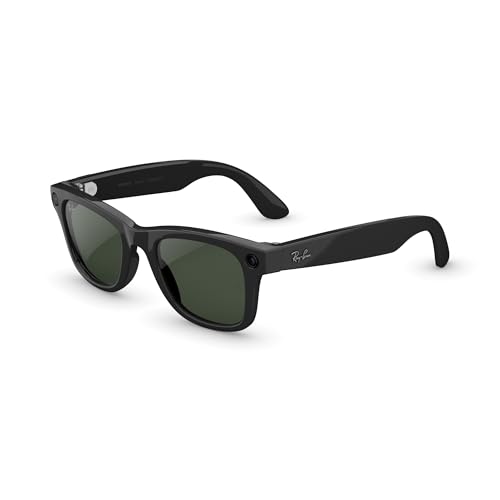
- #1 SELLING AI GLASSES – Tap into iconic style for men and women, and advanced technology with the newest generation of R…
- UP TO 8 HOURS OF BATTERY LIFE – On a full charge, these smart AI glasses can last 2x longer than previous generations, u…
- 3K ULTRA HD: RECORD SHARP VIDEOS WITH RICH DETAIL – Hands-free video recording with an ultra-wide 12 MP camera. With imp…
$459.00
Are AI Glasses a Good Fit for Blind or Low-Vision Users?
None of the companies behind the most popular AI glasses set out to build an assistive device. Meta designed Ray-Ban Meta for vacation photos and hands-free messaging, not as a tool for someone navigating the world without sight. And yet, almost by accident, the same camera-plus-AI combination built for social media has become something blind and low-vision communities discovered, adopted, and now talk about on calls hosted by groups like the American Council of the Blind. Whether that accident holds up as a genuinely good fit, or where it quietly falls apart, depends on exactly what someone needs the glasses to do.
What mainstream AI glasses can do for blind users
- Scene description: ask what’s in front of you and get a spoken description, useful for identifying objects, reading expressions, or checking what’s on a shelf.
- Text reading: point at a menu, label, letter, or sign and have it read aloud, including handwriting in some products.
- Live remote assistance: some accessibility-focused products (Envision, biped.ai) can connect you directly to a human assistant through services like Aira or Be My Eyes for harder situations.
- Hands-free operation: voice activation means a cane or guide dog can still occupy both hands, which matters more for blind users than for sighted ones.
Where mainstream AI glasses fall short
- No obstacle detection: Ray-Ban Meta, Google’s upcoming glasses, and similar audio-first products are not designed to detect curbs, steps, or obstacles in your path. They answer questions on request; they don’t continuously monitor your environment for hazards.
- Visual displays don’t help fully blind users: the Meta Ray-Ban Display’s in-lens screen, used for navigation and notifications, is built for people with usable vision. A fully blind user gets no benefit from a visual overlay they cannot see.
- Not medically certified: these are consumer electronics, not assistive medical devices, so there’s no clinical backing or formal accessibility certification behind their scene-description accuracy.
For someone who is fully blind and wants a device built specifically around safe, independent travel, dedicated accessibility hardware is the better fit: Envision Glasses for reading, recognition, and everyday tasks; .Lumen or biped.ai’s NOA for active obstacle avoidance and guided walking. For someone with low vision who mainly wants help reading text and identifying objects day to day, mainstream AI glasses like Ray-Ban Meta are often good enough, and considerably cheaper.
Can They Lead or Guide You, and Do They Have GPS?
This is where the products split sharply into two camps, and the difference matters a lot for anyone considering AI glasses as a mobility aid.
Glasses with GPS-based navigation
- Meta Ray-Ban Display ($799) is currently the only mainstream AI glasses product with built-in turn-by-turn pedestrian navigation. It shows a visual mini-map and directional arrows in the lens, paired with spoken cues. This is rolling out city by city in beta and currently covers around 32 US cities.
- Standard Ray-Ban Meta (no display) does not include turn-by-turn navigation. It can tell you what’s nearby or answer location questions through Meta AI, but it cannot actively guide you step by step.
- Google and Samsung’s upcoming Android XR glasses are expected to include in-view navigation on the display variant, with an audio-only Gemini pair launching first this fall without confirmed navigation depth.
Glasses (and wearables) built to actively guide you
“GPS-based directions” and “active guidance for someone who can’t see the path” are different problems. The mainstream products above tell you where to turn; they do not stop you from walking into a pole. Devices designed specifically for blind mobility close that gap:
- .Lumen uses cameras and AI, not just GPS, to detect obstacles and trace a safe walking path in real time, communicating direction through haptic and audio feedback rather than a screen.
- biped.ai’s NOA (worn on the shoulders, not as glasses) combines 170-degree obstacle detection with GPS turn-by-turn directions given in clock positions (“door at 2 o’clock”), explicitly designed to be used alongside a cane or guide dog rather than replace one.
- Envision’s Professional Edition includes more advanced location and object-finding tools alongside its text-reading features, though its core strength remains reading and recognition rather than continuous path-guidance.
The honest summary: mainstream AI glasses with GPS will tell you which way to go, but only the Display model shows it visually, which doesn’t help a fully blind user. Dedicated mobility devices like .Lumen and biped.ai are built to actually keep you safe and oriented step by step, but they are far more expensive, less widely available, and meant to work alongside, not replace, a cane or guide dog.
Can AI Glasses Be Used as Spy Cameras, and Can Footage Be Downloaded?
Picture this: someone is talking to you, smiling, glasses on, nothing unusual about them at all. There’s no phone in their hand, no camera visible, nothing to give it away. And yet there’s a real chance that conversation is being recorded, saved, and on its way to someone else’s phone before you’ve even said goodbye. That scenario isn’t speculation. It’s already happened, repeatedly, and it’s the reason this category keeps showing up in court bans, state legislatures, and news investigations rather than just gadget reviews. Here’s exactly how it works, and how far it actually goes.
How recording and downloading actually works
On Ray-Ban Meta (the best-documented example), photos and video are first saved to onboard storage in the frame itself. They stay there until the glasses sync with the Meta AI mobile app over Bluetooth and Wi-Fi, at which point footage transfers to the phone’s regular camera roll and can be edited, shared, or backed up like any other phone photo or video. Default video clips are capped at 3 minutes per recording, though you can immediately start another, and resolution on newer models reaches up to 3K. Once footage lands on the phone, it can be exported, emailed, uploaded, or moved to a computer exactly like any other video file.
This matters for the “spy camera” question because it means nothing about the footage stays locked to the glasses. Anything recorded is fully downloadable, shareable, and storable indefinitely once it reaches a connected phone.
The recording-light problem
Meta builds in a small LED that lights up while recording, specifically so people nearby know they’re on camera, and the glasses are designed to refuse to record if that light is covered. In practice, this safeguard has been undermined: journalists and outlets including 404 Media and TechRadar documented a cottage industry of paid modders who physically disable the LED’s circuit, creating glasses that record without any visible indicator. Meta has stated this violates its terms of service and has increased the light’s size and brightness in newer hardware, but the workaround remains a real, reported issue rather than a theoretical risk.
This is also the central reason AI glasses keep showing up in news coverage about non-consensual filming: because the frame looks like ordinary eyewear, people often don’t realize a conversation or interaction might be recorded at all, light or no light.
Where it’s been an actual problem
- Several reported cases involve people, often women, discovering after the fact that an interaction (in a salon, on the street, in a store) had been filmed and posted online without their knowledge or consent.
- A Philadelphia court banned the use of smart glasses with recording features in its courtrooms after concerns about covert filming during proceedings.
- Bars, gyms, casinos, locker rooms, and similar venues increasingly post explicit no-recording-device policies that apply to smart glasses, the same way many already restrict phone cameras.
- In one widely reported case, a company’s own warehouse staff reported being able to view bystander footage, including footage shot inside bathrooms, that had been captured by employees’ glasses and routed through internal review systems.
What the law actually says
Wearing and owning camera glasses is legal essentially everywhere, and filming in genuinely public places, where people have no reasonable expectation of privacy, is generally lawful too. The legal risk concentrates around two things: audio, and private spaces. Many US states require all parties to consent before a private conversation can legally be recorded, and recording someone in a restroom, locker room, or similar private setting is typically a separate, more serious offense (often a felony) regardless of consent rules. A handful of jurisdictions are now writing rules specific to wearables: Pennsylvania has considered legislation requiring a functioning indicator light, and California’s proposed Wearable Device Privacy Protection Act would criminalize secretly recording people in businesses using a wearable device. Outside the US, the EU AI Act already prohibits real-time biometric identification of people in public spaces outright, which is directly relevant if facial recognition features get added to these products. None of this amounts to a comprehensive law built specifically for AI glasses; most of what currently applies is older wiretapping, voyeurism, and biometric-privacy law being stretched to cover a new device.
Can They Be Set to Avoid Recording in Bathrooms, or Triggered to Record Calls?
Two fair follow-up questions, and they have different answers.
Automatically avoiding sensitive locations
In theory, this is straightforward: a phone already knows roughly where it is, so glasses paired to one could, in principle, switch the camera off automatically inside a bathroom, locker room, or other flagged location. This is called geofencing, and it already exists, just not where most people would expect. It’s a feature security and privacy consultants recommend to businesses, deployed through enterprise device-management software so a company can force-disable cameras on staff-issued smart glasses inside break rooms, medical facilities, or client meeting rooms.
On consumer products like Ray-Ban Meta, that automatic switch doesn’t exist. Meta’s own published guidance tells users to manually turn off their glasses in sensitive spaces like a doctor’s office, locker room, public bathroom, school, or place of worship, which means the safeguard is a written suggestion, not software. There’s no setting you can flip that says “never record within these coordinates,” and nothing stops someone from forgetting, or choosing not to, when they walk into a bathroom while still wearing an active pair. Investigative reporting has specifically flagged this gap: footage shot inside bathrooms has reportedly turned up in the same data pipeline used for human review of AI training material, precisely because nothing technical prevents it from being recorded in the first place.
So the capability to build that kind of automatic shutoff clearly exists, since businesses already buy it as a managed feature, but no major consumer AI glasses brand currently ships it switched on by default for everyday buyers. If this is a priority for you, the realistic move is the same one Meta recommends: get in the habit of switching the glasses off by hand before entering a private space, the same way you’d pocket a phone.
Recording phone calls
This one has a cleaner answer. Ray-Ban Meta and similar AI glasses do let you make and receive phone calls hands-free, using the same microphone array that captures video audio, and call quality on these mics is generally well reviewed. But making a call and recording a call are different features, and the second one isn’t offered. There’s no built-in command or setting on Ray-Ban Meta, or on any other mainstream AI glasses currently shipping, that records a phone conversation to a file the way the camera records video.
That said, two things are worth flagging honestly. First, the same open microphones used for calls are also listening whenever the camera is recording video, so if someone is mid-call on speaker near an active recording, that audio could end up captured as part of the video, not the call itself. Second, call recording remains heavily regulated separately from camera laws: many US states require every party’s consent before a phone call can be legally recorded at all, regardless of what device is used, so even if a future product added the feature, using it without telling the other person would carry real legal exposure in a lot of places.
Where AI Glasses Still Fall Short
For all the progress, this is still an early-generation category, and the gaps are consistent enough across brands that they’re worth calling out plainly rather than burying in a buying checklist.
Battery life is the biggest unsolved problem
This is the complaint that comes up most often, and for good reason. Audio-only models like Ray-Ban Meta Gen 2 manage a real-world 5 to 8 hours of mixed use, which is workable, but anything involving heavy video capture or a display cuts that sharply. The Meta Ray-Ban Display is rated around 6 hours but independent testing has shown it dropping to 40% after just 90 minutes of continuous use, and devices doing constant live captioning or translation can realistically run out in 2 to 4 hours. The underlying issue is physical, not just a software fix: fitting a battery, a chip, a camera, and (often) a display into a frame that still has to feel like ordinary eyewear leaves very little room for a bigger cell. Engineers describe it as an “impossible triangle” between weight, features, and battery life, and there’s no breakthrough on the horizon that solves all three at once.
Narrow displays and a limited field of view
On display-equipped models, the in-lens screen covers a small slice of your vision, typically under 50 degrees, and Meta Ray-Ban Display sits at around 20 degrees, which reviewers describe as closer to a notification ticker than a real heads-up display. Human peripheral vision spans roughly 180 degrees, so even the best current AR glasses are showing information in a small window rather than overlaying your whole view. Wider field-of-view prototypes exist (Meta’s Orion research glasses claim around 70 degrees using more expensive waveguide material), but nothing at that width is priced or built for daily consumer use yet.
Heavy reliance on a paired phone and the cloud
Despite looking self-contained, most AI glasses still depend on a connected smartphone for internet access, GPS positioning, and the heavier AI processing, which means the assistant doesn’t work, or works in a limited offline mode, if your phone is out of range or your data connection drops. This also means your voice and visual data routinely round-trips through company servers, which is part of why the human-review controversies (footage being seen by outsourced contractors) keep surfacing.
AI accuracy and usefulness are inconsistent
Scene description and object recognition are genuinely useful but not flawless; users and reviewers report a real-world gap between marketed AI features and what the assistant reliably gets right, and on lower-end or earlier-generation hardware some buyers report finding the AI features barely better than the assistant already built into their phone, undercutting the core reason to buy glasses in the first place.
Comfort, heat, and design tradeoffs
Fitting all this electronics into a normal-looking frame still means tradeoffs: some users report nose-pad pressure and discomfort during long wear, audio leakage at higher volumes from open-ear speakers, and noticeable warmth on the frame during heavy camera or display use. Models that try to avoid these tradeoffs by going lighter often do it by cutting a feature, like a display or a camera, rather than solving the underlying engineering problem.
No automatic safeguards for sensitive places or audio
As covered earlier in this article, there’s currently no consumer-facing automatic shutoff for sensitive locations, and no built-in, consent-aware system for handling private conversations responsibly. Right now, responsible use depends entirely on the wearer remembering to act, not on the device enforcing anything.
What Should Be Added in Future Generations
Based on where the gaps are clearest today, a few changes would move this category from “interesting gadget” to something closer to indispensable:
- Real all-day battery life without sacrificing features — likely needs a genuine battery chemistry improvement (solid-state or silicon-anode cells are the most discussed candidates), not just smarter software power management, which has already been pushed close to its limit.
- Wider, brighter, more affordable displays — bringing something closer to Orion’s 70-degree field of view down to a consumer price point would make in-lens navigation and captions feel like a real interface rather than a ticker.
- Built-in, automatic privacy zones — consumer glasses should offer the geofencing feature that’s already sold to enterprises: an opt-in setting that auto-disables the camera and mic around the user’s own flagged locations (home address, a workplace bathroom, a place of worship) without relying on the wearer remembering every time.
- Clearer, harder-to-defeat recording indicators — a tamper-evident or hardware-level recording light (one that can’t quietly be modded out, and that fails the device into a no-record state if interfered with) would close the biggest documented loophole in the category.
- More on-device processing, less cloud round-tripping — running more of the AI workload locally would reduce both the privacy exposure of constant cloud uploads and the dependency on a connected phone for basic functionality.
- Stronger accessibility-specific certification — mainstream brands could formally validate and support their products for blind and low-vision use (accuracy benchmarks, dedicated obstacle-awareness modes) rather than leaving that entirely to separate, much more expensive specialist devices like Envision or .Lumen.
- Cross-brand interoperability — right now choosing glasses means choosing an AI ecosystem (Meta AI, Gemini, eventually Siri) with no easy way to switch assistants later; a more open standard would let the hardware and the AI layer be chosen independently.
- A genuine “remember this person” feature — one of the most requested capabilities is glasses that recognize someone you’ve met before and quietly remind you of their name, the way a personal assistant might. It would be a real, everyday upgrade over the constant small embarrassment of forgetting a name at a conference, a school gate, or a second date.
This feature already exists, and it’s a bigger story than it sounds
Remember the name problem from the start of this article? This isn’t a speculative wish; it’s already been built. In June 2026, Wired reported finding dormant code inside Meta’s companion app, internally named “NameTag” and previously surfaced in the app’s interface as a “Connections” feature inviting users to “remember the people you met.” According to the investigation, the system uses three separate AI models to detect a face through the glasses’ camera, convert it into a biometric “faceprint,” store that faceprint on the phone, and notify the wearer when it later recognizes the same person, exactly the feature being asked for here. The code had quietly reached more than 50 million phones since January 2026 without users being told it was there, though researchers who examined it confirmed it isn’t currently switched on or sending data to Meta’s servers.
Meta has acknowledged exploring facial recognition for its glasses but says no decision has been made to ship it, and that it isn’t building a central face database. The reason this is worth knowing, rather than just wishing for the feature and moving on, is that it shows exactly why this capability is so contested: the same system that quietly reminds you of a name is, by definition, a wearable, always-on facial recognition tool, and reporting has noted internal discussion of launching it during a period when public attention might be focused elsewhere, which is precisely what’s drawn criticism from privacy researchers and lawmakers. If this feature does ship, the more interesting question won’t be whether it’s useful (it clearly would be), but whether it ships with real consent built in: ideally limited to people who’ve explicitly opted in to being remembered by you, rather than working on anyone whose face the camera happens to see.
What If You Already Wear Prescription Glasses?
This used to be the awkward question nobody had a great answer for: clip a camera-and-AI gadget onto your existing frames, or give up your prescription to try a new category of eyewear? That’s largely been solved, though some approaches are more convenient than others.
The two approaches
- Factory-fitted prescription lenses — the manufacturer or an optical partner builds your actual prescription into the AI glasses’ lenses before they reach you. Ray-Ban Meta and Oakley Meta frames support this through LensCrafters and select opticians, typically covering single-vision prescriptions from about -6.00 to +4.00 (check with an optician if you’re outside that range). Even Realities G2 and Brilliant Labs Halo also support prescription lenses built in from the factory.
- Clip-in prescription inserts — a separate prescription lens insert clips or magnets onto the frame behind the AI glasses’ own lens or display. This is the more common approach for display and AR glasses, including XREAL One, RayNeo Air 4 Pro, and VITURE’s Luma line, where the main lens is doing optical display work and a swappable insert handles vision correction instead.
What it costs, and how it works in practice
You’re generally paying for two separate things: the AI glasses hardware itself, and the lenses, the same way regular prescription eyewear works. Buying through a partner optician like LensCrafters lets you apply vision insurance benefits to the lens portion of the order, the same as any other prescription purchase, though the AI glasses hardware itself typically isn’t covered by insurance. You’ll need a current prescription and your pupillary distance (PD); if you don’t have your PD handy, most opticians can measure it quickly in store, and some brands offer phone-based PD measurement tools.
In-store tends to be the smoother route since an optician handles the prescription entry and fitting directly, while ordering online means uploading your prescription and PD yourself. Either way, turnaround has gotten faster: some retailers now offer next-day lens crafting for standard prescriptions, though more complex lenses (progressives, high prescriptions, specialty coatings) take longer.
Where this is headed
Meta has reportedly been developing prescription-first AI glasses models, internally referenced as Scriber and Blayzer, designed around vision correction from the ground up rather than treating it as an add-on, reflecting how large the prescription-wearing population actually is: roughly two-thirds of US adults wear corrective lenses, and global numbers are far higher. That signals where the category is heading: rather than prescription support being a workaround bolted onto camera-first hardware, future generations are likely to treat it as a default, not an afterthought.
Things Worth Weighing Before Buying
- Privacy and social comfort: see the dedicated sections above on recording, downloading, and the legal grey areas — this is one of the most actively debated aspects of the category, not a minor footnote.
- Battery life: audio-only AI glasses typically run longer per charge than display models, since powering a screen draws significantly more power.
- Ecosystem lock-in: most AI glasses tie you to one company’s assistant (Meta AI, Gemini, or eventually Siri), so the choice of glasses is also a choice of which AI ecosystem you’re committing to.
- Prescription needs: see the dedicated section above — most major brands now support this well, but the process and cost still vary by brand.
The Bottom Line
AI glasses are best understood as a new form factor for an AI assistant you already use on your phone, one that trades a screen in your pocket for a camera and microphone on your face. “Smart glasses” is the wider category that also includes glasses built primarily as a wearable display rather than a conversational assistant. The right choice between them comes down to one question: do you want to talk to your glasses, or do you want to look at them?
Disclaimer: This article contains affiliate links. If you purchase through these links, I may earn a small commission at no additional cost to you


