
Best Memory Cards for 4K Cameras & Drones
Choosing the best memory card for 4K video in 2026 is about more than storage capacity. Learn how speed classes, V30, V60, and V90 ratings, and card compatibility affect 4K recording quality, so you can pick the right SD or microSD card for your camera, drone, smartphone, or action camera.

Choosing the best memory card for 4K video in 2026 is about more than storage capacity. This guide breaks down speed classes — V30, V60, V90, and CFexpress — plus card compatibility, capacity planning, and what’s actually worth paying for, whether you shoot on a camera, drone, smartphone, or action camera. We’ve also added a section on buying and verifying memory cards in Kenya, where counterfeit cards are a real risk.
Thank you for reading this post, don't forget to subscribe!| QUICK ANSWER For most people shooting standard 4K/30 footage on a drone, action camera, or smartphone, a V30-rated UHS-I card such as the SanDisk Extreme is enough. If you shoot 4K/60 or high-bitrate codecs on a mirrorless or cinema camera, step up to a V60 card. Go V90/UHS-II only if your camera supports it and you shoot 6K, 8K, or RAW. If your camera uses CFexpress (most higher-end mirrorless and cinema bodies from 2023 onward), skip SD entirely — CFexpress is the only format fast enough for internal RAW and high-frame-rate 8K. Buy 128GB or larger; with global NAND prices still elevated in 2026, one larger card is usually cheaper per gigabyte than two smaller ones. In Kenya, buy only from verified sellers — counterfeit cards are common in the local market. |
Why Your Memory Card Choice Matters for 4K
Recording 4K video pushes far more data through a memory card than photos or HD footage ever did, and the wrong card shows it immediately: dropped frames, a frozen recording light, or a camera that simply refuses to start filming. Below is what actually determines whether a card can keep up, followed by current top picks across budgets and use cases — drone and action camera shooters, mirrorless and DSLR videographers, and professionals working in 6K/8K, RAW, or CFexpress-only bodies.
| What Matters | Why It Affects Your 4K Footage |
| Sustained write speed | The single biggest factor. A card that can’t sustain the minimum write speed drops frames or stops recording mid-clip. |
| Video Speed Class (V-rating) | V30 covers standard 4K/30. V60 and V90 are for 4K/60, high-bitrate codecs, and 6K/8K. |
| Bus interface (UHS-I vs UHS-II vs CFexpress) | UHS-I tops out around 104MB/s in theory. UHS-II hits 200–300MB/s with the second pin row. CFexpress Type B goes well beyond that and is required by many current cinema and high-end mirrorless bodies. |
| Capacity | 4K UHD footage runs roughly 45GB per hour at typical bitrates. High-bitrate codecs and 4K/60 use significantly more. |
| Reliability and build | A card that fails mid-shoot costs you footage no amount of editing can recover. Shock, water, and temperature resistance matter for outdoor and travel use. |
Who Needs What
- Casual creators and drone/action camera users: A V30 card is genuinely sufficient. GoPro, DJI drones, and most smartphones record standard 4K/30 well within a 30MB/s sustained write speed.
- Mirrorless and DSLR videographers: If your camera shoots 4K/60 or All-Intra codecs, a V60 card removes the risk of buffer errors during longer takes.
- Professional and cinema shooters: 6K, 8K, and RAW video need V90 with a UHS-II-compatible camera and reader — or CFexpress if your body requires it. Anything less and the card becomes the bottleneck, not the camera.
- Event and wedding videographers: Reliability matters as much as speed. A dropped frame during a ceremony cannot be reshot — buy from established brands with verified track records, and carry a spare.
Understanding Speed Ratings: V30 vs V60 vs V90
4K video needs a minimum sustained write speed of 30MB/s, which is why the SD Association created the Video Speed Class system specifically for video. The number after the V tells you the guaranteed minimum write speed in megabytes per second — a certified floor, not a marketing figure.
| Rating | Min. Write Speed | Bus Type | Best Suited For |
| V30 / U3 | 30MB/s | UHS-I | Standard 4K/30 on phones, drones, GoPro, entry DSLRs |
| V60 | 60MB/s | UHS-I or UHS-II | 4K/60, high-bitrate All-Intra footage, mirrorless burst shooting |
| V90 | 90MB/s | UHS-II only | 6K/8K, RAW video, professional cinema cameras |
One distinction trips up a lot of buyers: UHS-II cards have a second row of pins on the back and can theoretically hit 300MB/s, but you only see that speed if both your camera and your card reader support UHS-II. Put a UHS-II card in a UHS-I-only device and it still works — it just runs at UHS-I speeds, so you’ve paid the V90 premium for nothing.
What About CFexpress?
SD cards — even V90 UHS-II ones — top out around 300MB/s in the real world. That’s plenty for 4K and most 6K/8K workflows, but a growing number of cameras exceed it. High-frame-rate 8K, internal RAW, and All-Intra 4K at very high bitrates on bodies like the Canon EOS R5 II, Nikon Z8/Z9, and recent Sony cinema line either require CFexpress or perform noticeably better with it, since CFexpress Type B cards can sustain write speeds well above 1,000MB/s.
A simple way to decide which format you need:
- Your camera has a CFexpress slot and your manual specifies CFexpress for high-bitrate or RAW modes → buy CFexpress. SD won’t work in that slot, or the camera will restrict which modes you can use.
- Your camera has a UHS-II SD slot and tops out at 4K/60 or standard RAW stills → a V90 SD card covers you; CFexpress buys nothing extra.
- Your camera is UHS-I only (most drones, action cams, entry to mid-range mirrorless) → V30–V60 SD or microSD is the right call; CFexpress isn’t supported at all.
CFexpress cards cost considerably more per gigabyte than SD, and in 2026’s tight NAND market that premium has grown. Only buy one if your camera specifically requires or clearly benefits from it — check your manual’s supported card list before purchasing.
Which Card Fits Your Camera or Device
A quick reference for common devices. Always confirm against your specific model’s manual, since firmware and sensor changes shift requirements between generations.
| Device Type | Typical Requirement | Recommended Rating |
| Smartphones (4K/30–4K/60) | UHS-I, microSD or built-in | V30, A2 for app performance |
| GoPro / DJI Osmo action cameras | UHS-I microSD | V30 (V60 for 5.3K/4K120 modes) |
| DJI drones (Mini, Air, Mavic series) | UHS-I microSD | V30 |
| Entry to mid mirrorless (Sony A6xxx, Canon R-series entry) | UHS-I or UHS-II SD | V30–V60 |
| Enthusiast mirrorless (Sony A7 IV, Canon R6 II, Nikon Z6 III) | UHS-II SD | V60 |
| Pro mirrorless / cinema (Sony A1, Canon R5 II, Nikon Z8/Z9) | UHS-II SD and/or CFexpress | V90 or CFexpress, per mode |
| Nintendo Switch | UHS-I microSD | A1/A2 (V-rating not relevant) |
How Much Storage Do You Actually Need?
An hour of standard 4K/30 footage runs roughly 45GB at typical consumer bitrates. High-bitrate 4K/60 or All-Intra footage from a mirrorless camera can use double or triple that.
| Capacity | 4K/30 (~45GB/hr) | 4K/60 (~90GB/hr) | 4K High-Bitrate (~130GB/hr) |
| 64GB | ~1.4 hrs | ~45 min | ~30 min |
| 128GB | ~2.8 hrs | ~1.4 hrs | ~1 hr |
| 256GB | ~5.7 hrs | ~2.8 hrs | ~2 hrs |
| 512GB | ~11.4 hrs | ~5.7 hrs | ~4 hrs |
128GB is the practical sweet spot for most shooters — long enough between card swaps without an outsized price jump. Step up to 256GB or 512GB only if you’re shooting multi-hour events or high-bitrate 4K/60 and don’t want to swap cards mid-shoot.
| MARKET CONTEXT Memory card prices have risen sharply through 2026 as a global NAND flash shortage — driven largely by AI data centers buying up chip supply — has pushed wholesale memory costs up significantly. Cards that cost $20–30 in late 2025 are now noticeably more expensive, and high-capacity, high-speed cards (V90, UHS-II, CFexpress, 1TB+) have seen the steepest increases. Stock for some models has also become inconsistent. If you find a reputable card at a fair price, it’s worth buying sooner rather than waiting — and worth resisting unusually cheap listings from unfamiliar sellers, since counterfeit cards have become more common as prices climb. |
Top Memory Card Picks for 4K Video
| Card | Rating | Read / Write | Best For | Format |
| SanDisk Extreme PRO (UHS-II) | V90 / U3 | Up to 300 / 260MB/s | 6K/8K, high-end mirrorless, RAW video | SD |
| SanDisk Extreme PRO V60 | V60 / U3 | Up to 280 / 100MB/s | 4K/60 on a budget, most mirrorless cameras | SD |
| SanDisk Extreme (UHS-I) | V30 / U3 | Up to 230 / 120MB/s | Drones, action cameras, everyday 4K/30 | SD / microSD |
| Kingston Canvas React Plus | V90 / U3 | Up to 300 / 260MB/s | Value-priced V90 alternative for pro video | SD |
| Lexar Professional Silver Plus | V30 / U3 / A2 | High UHS-I speeds | GoPro, Switch, smartphones, general 4K | microSD |
| Sony SF-G Tough | V90 / U3 | Up to 300 / 299MB/s | 8K, extreme durability for outdoor/pro shoots | SD |
| Lexar Professional 2000x | V90 / U3 | Up to 300 / 260MB/s | High-bitrate 4K/8K at a lower price than SanDisk | SD |
| SanDisk Extreme PRO CFexpress Type B | N/A (CFexpress) | Up to 1,700 / 1,200MB/s | 8K RAW and All-Intra on cinema/pro mirrorless bodies | CFexpress |
Best Overall for Professional 4K/8K: SanDisk Extreme PRO (UHS-II, V90)
This is the card to buy if your camera supports UHS-II and you’re shooting demanding 4K/60, 6K, or 8K footage. With certified write speeds up to 260MB/s, buffer clearing is effectively instant and offloading hours of footage takes minutes instead of an evening. The tradeoff is price — V90 UHS-II cards carry a real premium, and that premium has grown with 2026’s NAND shortage, so this card only makes sense if your device can actually use the speed.
| Strengths | Trade-offs |
| + Fastest certified write speed among SD cards + Handles 8K and RAW video without dropped frames + Rugged build rated for water, shock, and temperature extremes | – Premium price, especially under current market conditions – No benefit unless your camera and reader both support UHS-II – Overkill for casual 4K/30 shooting |

- INCREDIBLE STORAGE – Offering a spacious 512GB capacity, this SDXC memory card provides ample room for high-resolution p…
- BLAZING FAST READ SPEED – Experience rapid data transfers with a maximum read speed of 300 MB/s, significantly reducing …
- LIGHTNING-FAST WRITE SPEED – Maximize your camera’s performance with a maximum write speed of 260 MB/s and a minimum of …
$339.99
Best Value for 4K/60: SanDisk Extreme PRO V60
This card delivers most of the real-world benefit of the V90 model — fast buffer clearing, reliable 4K/60 recording — at a noticeably lower price, since its 100MB/s sustained write speed already covers anything short of 8K or RAW. For mirrorless shooters who don’t need the absolute ceiling, this is where the smart money goes.
| Strengths | Trade-offs |
| + Strong 4K/60 performance at a more accessible price + Fast 280MB/s read speed for quick offloading + Comfortable headroom over the V30 minimum | – Write speed caps at 100MB/s — not built for 8K or RAW – Still a UHS-II card, so benefits depend on device support |

- EXCEPTIONAL VIDEO CAPTURE. Designed for prosumers and professionals shooting with advanced MIL, dual-slot MIL-FF, and ci…
- SHOOT LONGER. Store more high-resolution video and image files with capacity options that range from 64GB up to 2TB. (1)
- GET MORE FROM YOUR CAMERA. Record cinema-quality 6K (3) video with the Video Speed Class 60 (V60) rating, (4) plus stand…
$329.95
Best for Drones, Action Cameras, and Everyday 4K: SanDisk Extreme (UHS-I, V30)
For the vast majority of 4K shooters — drone pilots, GoPro users, smartphone videographers, and entry-level DSLR or mirrorless owners — a V30 UHS-I card is genuinely enough. It meets the certified minimum for smooth 4K/30 recording, costs considerably less than UHS-II options, and is widely compatible since it doesn’t depend on a UHS-II-capable device.
| Strengths | Trade-offs |
| + Meets the V30 minimum needed for smooth 4K/30 + Works in any SD-compatible device, no special reader needed + Best price-to-performance ratio for everyday use | – Not rated for sustained 4K/60 or high-bitrate codecs – Lower-capacity versions write slower than higher-capacity ones in the same line |

- With SanDisk QuickFlow Technology10 (64GB – 1TB), this card optimizes performance for timesaving media offloads with qui…
- Capture fast-action photos or shoot 4K UHD video2 with write speeds of up to 130MB/s.9The SanDisk Extreme microSDXC UHS-…
- Ideal for recording outdoor adventures, weekend trips, or sporting events without skipping frames. With up to 1TB1, the …
$39.95
Best Value V90 Alternative: Kingston Canvas React Plus
Kingston’s flagship card matches the SanDisk Extreme PRO’s V90 specs and 300MB/s read speed at a meaningfully lower cost, with a lifetime warranty and reports of multi-year reliability from long-term users. The 128GB capacity is the practical ceiling for some workflows — at high-bitrate 4K/60, expect roughly 40–50 minutes of recording per card — so event videographers covering longer sessions should plan to carry spares or size up.
| Strengths | Trade-offs |
| + True V90 performance at a lower price than SanDisk’s equivalent + Lifetime warranty + Waterproof, temperature-proof, and X-ray-proof construction | – 128GB fills up fast at 4K/60 high-bitrate (40–50 min) – Less brand recognition than SanDisk in some markets |

- High-performance UHS-II standard
- Ultimate speeds to support professional camera use
- Large storage capacities for digital content library
$499.00
Best microSD for GoPro, Switch, and Drones: Lexar Professional Silver Plus
For devices that take microSD rather than full-size SD — most action cameras, drones, and the Nintendo Switch — this card consistently tests among the fastest UHS-I options for both sequential and random read/write speeds, with U3, V30, and A2 ratings covering 4K video and app performance alike. It typically undercuts comparable Samsung and SanDisk microSD cards on price, though 2026’s market volatility means it’s worth checking current pricing before assuming that holds.
| Strengths | Trade-offs |
| + Among the fastest UHS-I cards in independent testing + Full V30/U3/A2 certification for video and apps + Competitively priced relative to Samsung and SanDisk equivalents | – UHS-I ceiling, so not suited to 8K or RAW workflows – microSD pricing and stock have both been volatile in 2026 |

- 225MB/s max read speed expedites transfers, and reduces wait times
- 160MB/s max write speed ensures you’re ready to get the shot
- Rated V30, it supports up to 4K 60FPS video recording to capture smooth, high-quality video
$94.99
Best Rugged V90 for Outdoor and Professional Use: Sony SF-G Tough
Sony’s Tough series is built for shoots where the card takes physical abuse — no card door tab to snap off, a reinforced one-piece shell, and independently verified bend and break resistance well beyond standard SD cards. Performance-wise it sits alongside the SanDisk and Kingston V90 options, so the reason to choose it is durability, not speed.
| Strengths | Trade-offs |
| + Most physically rugged V90 SD card in this lineup + Matches top-tier V90 read/write speeds + No door/tab to break off in the field | – Priced at a premium versus Kingston’s V90 alternative – Sony’s card ecosystem has less third-party reader support than SanDisk’s |

- Tough specs: world’s first one-piece molded construction with high hardness materials have resulted in the world’s highe…
- Ribless, no write protection switch design: world’s first ribless, no write protection switch design6 removed easy to br…
- Fast file transfer: up to 300 MB/s transfer speed and up to 299MB/s write speed 3. Uhs-ii, Class 10, U3 compliant. Fast …
$252.98
Best V90 for the Money: Lexar Professional 2000x
Lexar’s professional line consistently lands close to SanDisk and Sony on real-world speed while pricing below both, which is why it shows up repeatedly in independent testing roundups as the value pick for creators who need genuine V90 performance without paying the brand premium. It’s a reasonable second card to pair with a pricier primary card for professionals who want a backup that won’t bottleneck a shoot.
| Strengths | Trade-offs |
| + V90 performance at a lower price than SanDisk or Sony equivalents + Well-regarded in independent third-party testing + Good option as a backup card for professional kits | – Brand recognition and resale value lag SanDisk in some markets – Availability in Kenya may be more limited than SanDisk/Kingston — confirm stock before recommending |
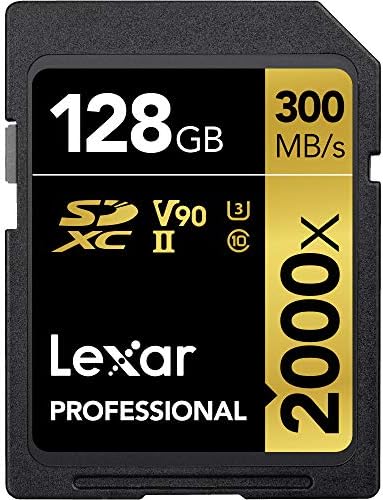
- High-speed performance leverages UHS-II technology (U3) for a read transfer speed up to 2000x (300MB/s)
- Captures high-quality images and extended lengths of stunning 1080p full-HD, 3D, and 4K video with a DSLR camera, HD cam…
- Includes SD UHS-II reader for high-speed file transfer from card to computer, dramatically accelerating workflow
$249.99
Best for 8K RAW and Cinema Bodies: SanDisk Extreme PRO CFexpress Type B
If your camera has a CFexpress slot and your shooting mode requires it — high-frame-rate 8K, internal RAW, or high-bitrate All-Intra on bodies like the Canon EOS R5 II or Nikon Z8/Z9 — this is the format, not an upgrade option. Sustained write speeds well above 1,000MB/s mean the card is never the limiting factor, but pricing per gigabyte is substantially higher than even V90 SD, and 2026’s NAND shortage has hit CFexpress especially hard.
| Strengths | Trade-offs |
| + Only format fast enough for high-frame-rate 8K RAW on current bodies + Write speeds that make SD’s V90 ceiling look modest + Required (not optional) on many current pro/cinema camera bodies | – Highest cost per gigabyte in this guide, and rising with the NAND shortage – Useless in any camera without a CFexpress slot — check your manual first |

- Read speeds of up to 1700MB/s and 1400MB/s write speeds offer low latency during high-speed recording and enhance workfl…
- Enables smooth, RAW 4K video(1) | (1)4K video (4069x2160p) support may vary based on host device, file attributes, usage…
- The Cfexpress CardType B is backwards-compatible with select XQD cameras that adopt firmware enabling Cfexpress(2) | (2)…
$309.00
How to Choose: A Quick Checklist
- Check your camera’s manual for the minimum required speed class and card format (SD vs CFexpress) — this overrides any general recommendation.
- Match V-rating to your footage: V30 for standard 4K/30, V60 for 4K/60 and high-bitrate, V90 for 6K/8K/RAW.
- If your camera has a CFexpress slot, confirm which shooting modes actually require it — you may not need it for every mode.
- Confirm UHS-II support on both your camera and card reader before paying the V90 premium.
- Size capacity to your longest typical shoot using the table above, then round up one tier.
- Buy from established brands (SanDisk, Samsung, Kingston, Lexar, Sony) and avoid unusually cheap listings from unverified sellers — particularly important in Kenya, where counterfeit cards are more common.
- Format the card in the device you’ll use it in, not on a computer, for the most reliable results.
Frequently Asked Questions
What’s the minimum SD card speed for 4K video?
You need a card rated at least V30 (or U3), which guarantees a minimum sustained write speed of 30MB/s. This covers standard 4K/30 footage from drones, action cameras, and most smartphones.
Do I need a UHS-II card for 4K video?
Only if you’re shooting 4K/60 with a high-bitrate codec, or 6K/8K footage, and your camera and card reader both support UHS-II. For standard 4K/30, a UHS-I V30 card is sufficient and considerably cheaper.
Is CFexpress necessary for 4K video, or only for 8K?
For standard 4K, no — even entry-level V30 SD cards handle it. CFexpress becomes necessary when your specific camera requires it for certain modes, which today mainly means high-frame-rate 8K, internal RAW, or very high-bitrate All-Intra footage on newer pro and cinema bodies. Check your camera’s supported card list rather than assuming.
SD card or microSD for 4K video — does it matter?
The card format is dictated by your device’s card slot, not a performance choice — full-size SD and microSD with equivalent V-ratings perform the same for video. Cameras and camcorders generally take SD; drones, action cameras, and phones generally take microSD, often with an SD adapter included.
What’s the difference between SD card speed class and video speed class?
Speed Class (C2–C10) and UHS Speed Class (U1, U3) are older ratings; Video Speed Class (V6–V90) was introduced specifically for video and is the most reliable indicator for 4K/8K recording. A single card can carry multiple ratings at once — for example, one card might be marked C10, U3, and V30.
Can I use a UHS-II card in a UHS-I device, or vice versa?
A UHS-II card works in a UHS-I device, but only at UHS-I speeds — you won’t damage anything, but you’ve paid for speed you can’t use. A true UHS-I-only reader or slot cannot exceed roughly 104MB/s regardless of the card inserted.
Why are memory card prices so high in 2026?
A global NAND flash shortage, driven largely by AI data centers consuming chip supply, has pushed wholesale memory prices up sharply through 2026. High-capacity and high-speed cards — including CFexpress — have seen the steepest increases, and some models have become harder to find in stock.
How long does a 128GB card record at 4K?
Roughly 2.8 hours at standard 4K/30 bitrates, around 1.4 hours at 4K/60, and closer to an hour at high-bitrate 4K/60 codecs like All-Intra. Actual run time varies by camera and bitrate setting.
Should I buy one large card or several smaller ones?
For most shooters, one larger card (128GB or 256GB) is simpler and currently better value per gigabyte than several smaller cards, given 2026 pricing. Professionals covering long events without backup options may still prefer carrying multiple cards to limit data loss if one card fails.
The Verdict
There’s no single best memory card for 4K video — there’s a best card for what you actually shoot. Drone pilots, GoPro users, and everyday 4K shooters should buy a V30 UHS-I card like the SanDisk Extreme and spend the savings elsewhere. Mirrorless videographers shooting 4K/60 get real benefit from stepping up to a V60 card. Professionals working in 6K, 8K, or RAW should pay the V90/UHS-II premium — or move to CFexpress if their camera requires it — but only where the camera can actually use the speed. Whatever you choose, buy from a reputable brand, and don’t skimp on capacity; in a market where prices are climbing, the card you buy today is one you’ll want to last.
By Sam — The Tech Analyst, Digital Choice Hub | Updated July 2026
This guide is based on published manufacturer specifications, SD Association speed class standards, aggregated verified-buyer review data, and current Kenya market pricing and availability as of July 2026. We do not publish first-person testing claims we haven’t genuinely performed. Prices and availability change frequently amid ongoing memory market volatility — always confirm current specs and pricing before purchase.
Disclaimer: This article contains affiliate links. If you purchase through these links, I may earn a small commission at no additional cost to you
