
Why the Right Camera Matters for Bloggers
A great blog deserves great visuals. This guide explains why camera matters for bloggers, what features to prioritize, and how the right camera can elevate your content, attract more readers, and build a stronger online brand.

You’ve blamed the algorithm. You’ve blamed your hook. You’ve blamed the lighting in your apartment, your hairline, your microphone, your editing style, your thumbnail, your posting schedule, and even the cruel, indifferent void of the “For You” page.
Thank you for reading this post, don't forget to subscribe!But there’s one thing you’ve probably never blamed: the camera you’re using.
For many bloggers and content creators, the camera isn’t just another gadget—it’s the tool that shapes how audiences see your content. While a smartphone can produce excellent results, not every phone camera is built for professional-quality blogging. If your photos and videos aren’t making the impact you want, the problem may not be your creativity. It may be your camera.
That’s the part nobody wants to hear, because it sounds like a sales pitch. It isn’t. It’s a workflow problem, and workflow problems are the most boring, fixable, unsexy reason content underperforms — which is exactly why creators ignore them and chase “better ideas” instead.
If you’re still shooting on a phone held at arm’s length, or worse, a phone duct-taped to a cheap gimbal that whines and drifts, here’s what you’re actually losing. Not someday. Right now, on every video you post. And for each problem, there’s a specific fix — not a vague gesture at “buy a better camera,” but the actual model built to solve it.
The Stabilization Gap Isn’t Subtle Anymore
Phone software stabilization crops your frame, smooths motion electronically, and still can’t fully fix the micro-judder of a handheld walk-and-talk. You know the look. Slightly seasick. Slightly amateur. You’ve trained yourself to not notice it because you watch your own footage every day. Your audience notices it in the first three seconds, even if they couldn’t tell you why a video felt “off.”
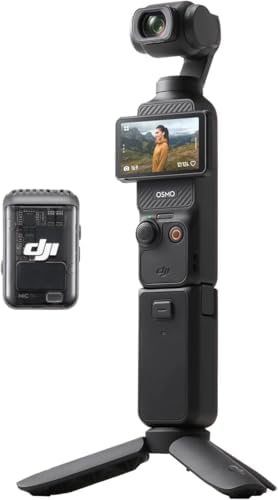
A 3-axis mechanical gimbal solves this at the hardware level, not the software level. That distinction matters more than it sounds. Software stabilization is a correction. Mechanical stabilization is prevention. DJI’s pocket gimbal cameras handle motion the way a Steadicam operator does — by physically isolating the camera from your movement — not by digitally guessing what to smooth out after the fact, the way your phone does.
This is the single biggest reason reviewers keep coming back to this format: compared to most action cameras and smartphones, these cameras offer deeper depth of field and more natural background blur, and the stabilization holds up specifically in the situations that kill phone footage — walking, talking, turning a corner, sitting down. For creators who value speed and simplicity, the single-device setup is a real asset, letting them travel light and capture spontaneous moments without fiddling with phone settings mid-shot.
The fix: DJI Osmo Pocket 3. This is the cheapest, fastest fix on this entire list, and the one with the best cost-to-impact ratio. Reviewers consistently land on it as the default for solo creators doing face-to-camera vlogging, walking shots, interviews, low-light street content, and polished handheld video. If you fix nothing else this year, fix this one. Skip it only if you need waterproofing or rough outdoor durability — it’s a creator camera, not a sports camera.
You’re Filming on a Sensor Built for Texting
Here’s the uncomfortable math nobody puts on a spec sheet: your phone’s sensor is small because the phone has forty other jobs to do. Calls, maps, banking, a thousand apps. The camera is a tenant in a crowded building, not the building itself.
A dedicated creator camera doesn’t have that compromise. The sensor gathers more light, resulting in cleaner images and better detail, especially in low-light conditions — which is precisely the condition every phone camera collapses in: restaurants, bars, evening interviews, golden hour that turns into blue hour before you’ve finished the take. The newest models push this further, with 14 stops of dynamic range, capturing stunning detail in both high-brightness skies and deep shadows — the kind of range that makes footage look graded before you’ve touched a color tool.
This isn’t a marginal upgrade. It’s the difference between footage you have to apologize for and footage you don’t have to think about.
The fix depends on where your low light happens. For interiors — cafés, restaurants, evening interviews — the DJI Osmo Pocket 4 is the upgrade that matters, thanks to its new 1-inch sensor with 2.5 stops more dynamic range over the Pocket 3. For outdoor low light — night walks, dusk shoots, outdoor events — the Osmo Action 5 Pro has a dedicated SuperNight mode built for exactly this. Keep your expectations honest either way: these close the gap with your phone dramatically, they don’t turn a pocket camera into a large-sensor cinema setup.
Your Audio Is Quietly Sabotaging Every Video
You can have the sharpest 4K in the world and lose the viewer in the first four seconds to tinny, roomy, phone-mic audio. Viewers forgive a slightly soft picture. They do not forgive audio they have to strain to hear, and they will not tell you that’s why they left — they’ll just leave.
The newest creator cameras quietly fixed this by building studio-grade audio capture directly into the body. A four-channel system captures immersive, 360-degree sound, meaning creators won’t always need an external mic for high-quality vlogs anymore. That’s not a nice-to-have. That’s removing an entire piece of gear — and an entire point of failure — from your kit bag.
The fix: Osmo Pocket 4 specifically — not the Pocket 3. This is the real differentiator that justifies paying more than the Pocket 3, beyond marginal sensor gains. The Pocket 4’s OsmoAudio system is new to this generation; the Pocket 3 doesn’t have it. If audio is your single biggest complaint about your own footage right now, this is the fastest-paying-off upgrade on this entire list, because it deletes an entire accessory category from your kit bag.
“I’ll Just Crop It for TikTok” Is Costing You Resolution You Paid For
Here’s a habit worth interrogating: shooting horizontal, then cropping vertical in post. Every time you do that, you’re throwing away pixels you already captured, softening your footage, and fighting your framing after the fact instead of nailing it on the day.
The platforms moved. Most gear didn’t, until recently. Native vertical capture is now built directly into hardware rather than bolted on as an editing-software afterthought — a single-lens vertical boost mode lets creators capture wide-angle vertical footage straight from the camera, with no awkward cropping and no resolution loss. Shoot in 2.7K or 4K and publish directly to TikTok, Instagram Reels, or YouTube Shorts without the quality tax you’ve been quietly paying for years.
The fix: DJI Osmo 360. This is the one genuinely unique fix in this entire list — none of the Pocket or Action models solve the crop problem natively the way the Osmo 360 does, via its single-lens 9:16 vertical boost mode. It also recently got significantly cheaper for what it does, with combo pricing now undercutting most premium action cameras while still offering full 360 capture. Skip this one if you only ever shoot flat, single-angle talking-head content — the reframing tools are wasted on a static interview setup, and that money is better spent on a Pocket model instead.
You Are One Bad Take Away from Re-Shooting Everything
Phone autofocus hunts. It pulses. It loses your face the moment you turn your head to glance at your notes. You’ve felt this — the small flash of panic mid-take when the lens visibly refocuses and you have to decide whether to keep rolling or start over.
This is solved territory in dedicated creator hardware, and reviewers are blunt about how decisively it’s solved: these sensors rival some of the best compact vlogging cameras, with excellent subject tracking and frame rates up to 4K/120fps. Subject tracking that actually holds a lock on your face while you move, gesture, and turn — instead of a phone that treats your motion as a problem to recover from.
The fix: Osmo Pocket 3 or Pocket 4 — both handle this well. The Pocket 4 upgrades to ActiveTrack 6.0 for more accurate tracking, but the improvement over the Pocket 3 is incremental, not transformative. If autofocus hunting is genuinely your biggest frustration and budget is tight, the Pocket 3 already solves it well enough that you won’t need to pay more for this specific problem.

The Storage Excuse Just Got Deleted
“I forgot my SD card” has ended footage that never got shot. It’s such a common failure point that it’s become a punchline in creator group chats — right up until it’s your shoot that gets ruined by it.
Current-generation creator cameras removed the excuse entirely. With over 100GB of internal high-speed storage, you can record immediately even if you forget your SD card, and an 800MB/s transfer speed means your files move to your computer in seconds. The gear stopped waiting on you to remember accessories. It assumes you’ll forget, and plans around it.
The fix: Osmo Pocket 4 — this is Pocket-4-specific, not a Pocket 3 feature. If you’ve ever genuinely lost a shoot to a missing or full SD card, this alone may be reason enough to skip the Pocket 3 and go straight to the Pocket 4.
“But My Phone Is Basically a Cinema Camera Now”
No. It really isn’t, and the gap is widening, not closing.
This is the line creators tell themselves to avoid an upgrade decision, and it was more true two years ago than it is today. Phone camera marketing leans hard on megapixel counts and “computational photography” — a polite way of saying software is compensating for a sensor that’s fundamentally too small to do the job optically. Dedicated creator cameras don’t need the compensation, because the hardware doesn’t need rescuing.
The honest framing, the one serious reviewers actually land on after extended use, isn’t “buy this because it’s trendy.” It’s closer to: these cameras wrap up everything needed for video content creation into a slick, high-performing package — and that’s why this is the camera spotted at every press event, every creator meetup, every panel. Not hype. A quiet, collective, unglamorous decision by people whose income depends on footage quality to stop fighting their phones.
“I Don’t Need Aerial Shots, So This Doesn’t Apply to Me”
This isn’t about drones. It’s about ground-level footage — the talking-head shot, the walk-and-talk, the product close-up, the interview, the travel B-roll. The footage that makes up 90% of what you actually post.
If your content is built around appearing on camera, walking through a space, reviewing a product, or capturing a moment as it happens rather than staging it for thirty minutes — this is squarely your problem, not a “creator with a drone” problem.
If your content involves water, mud, snow, sports, or fast POV instead, none of the Pocket models are the right tool, no matter how good their image quality is — they cannot replace waterproof, mountable capture. That’s a different fix entirely: the Osmo Action 6 as the more flexible flagship for action and POV work, or the Osmo Action 5 Pro as the value pick, with 4K/120fps, water resistance to 20m without a case (60m with one), and a battery rated up to 240 minutes at 1080p/24 in lab conditions — expect somewhat less in real use with higher resolutions or cold weather.
What This Is Actually Costing You
Not the camera price. Cameras are a one-time cost you can budget for. What you’re actually losing every time you post phone-shot footage next to a competitor’s gimbal-stabilized, clean-audio, properly-exposed video in the same feed is the comparison the viewer makes in the half-second before they decide whether to keep watching.
You don’t get to control that comparison. The platform serves your video next to everyone else’s. And increasingly, “everyone else” includes creators who quietly solved the stabilization problem, the audio problem, the low-light problem, and the vertical-crop problem long before you did.
The algorithm doesn’t penalize bad ideas as harshly as it penalizes footage that subconsciously reads as “amateur” in the first three seconds. You can have the better idea, the better hook, the better edit — and still lose to a worse idea shot better.
That’s not a fun thing to sit with. It’s true anyway.
So What Now: The Honest Buying Order
This isn’t a push to buy the newest, most expensive thing on the market. If you can only fix one thing this year, fix it in this order of actual viewer impact:
- Stabilization first → Osmo Pocket 3. Removes the “amateur” tell fastest, for the lowest cost on this list.
- Audio second → Osmo Pocket 4, specifically for OsmoAudio, if budget stretches beyond the Pocket 3.
- Vertical-native capture third → Osmo 360, only if you’re genuinely losing resolution to cropping right now.
- Action/outdoor capability → Action 5 Pro or Action 6, but only if your content actually requires water, mounting, or impact resistance — don’t buy this to fix a talking-head problem.
One honest caveat worth repeating, because reviewers flag it consistently: the cheapest base camera is rarely the cheapest usable kit. Check whether a bundle includes batteries, mounts, a protective case, and audio accessories before comparing sticker prices — a “budget” body that needs another $150 in add-ons to actually shoot a usable video isn’t budget anymore.
Your hook was probably fine. Your idea was probably fine. The camera in your hand has been doing you dirty this whole time, and it’s never once apologized for it. Now you know exactly which one fixes that, and why.
Disclaimer: This article contains affiliate links. If you purchase through these links, I may earn a small commission at no additional cost to you


