
Smart Monitors Explained: The Hidden Upgrade Your Desk Needs
A smart monitor is more than just a display. With built-in apps, Wi-Fi, streaming, and productivity features, it can work without a PC. Discover how smart monitors compare to laptops, who makes them, and whether they're the right upgrade for your home or office.

Smart Monitors: The All-In-One Display Reshaping the Desktop
Thank you for reading this post, don't forget to subscribe!For most of computing history, the monitor has been the dumbest part of the desk — a passive sheet of glass that simply displayed whatever a connected computer sent to it. Over the last five years, that has started to change. A new category of display, the smart monitor, builds the kind of operating system normally found in a television directly into the panel, letting it stream video, run apps, browse the web, and join video calls with no computer attached at all. What began as a Samsung-led experiment in 2020 has since been adopted, in one form or another, by LG, ASUS, and other major display makers, and has become a genuine alternative to buying a second laptop or a small all-in-one PC for many households and home offices.
This article explains what a smart monitor actually is, the technology running underneath the glass, where it makes sense to use one, who is currently building them, and exactly how the category differs from a laptop — a distinction that is more nuanced than it first appears.
What Is a Smart Monitor?
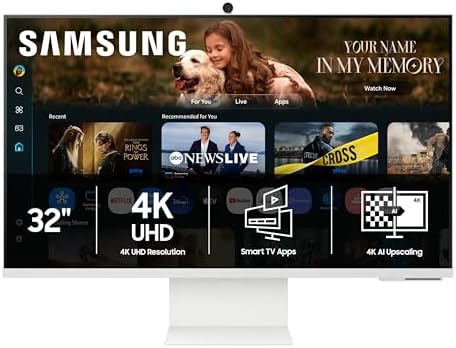
A smart monitor is a computer display with an embedded operating system, processor, Wi-Fi radio, and (usually) speakers and a microphone built directly into the chassis, allowing it to function as a standalone screen for streaming, browsing, and light productivity without being connected to a PC, laptop, or game console. It still works as a conventional monitor when plugged into a computer over HDMI, DisplayPort, or USB-C, but it does not require one to be useful.
The easiest way to understand the concept is to think of a smart monitor as the television industry’s idea of a computer monitor. Just as smart TVs added Netflix, YouTube, and app stores to what used to be a passive screen connected to a cable box, smart monitors add the same layer of built-in software to what used to be a passive screen connected to a PC.

The Technology Behind Smart Monitors
Embedded smart OS and chipset
At the heart of every smart monitor sits a small system-on-chip (SoC), conceptually identical to the processor found in a mid-range smart TV rather than anything resembling a laptop CPU. This chip runs a dedicated smart platform rather than a general desktop operating system:
- Samsung’s Smart Monitor line runs Tizen OS, the same platform used across Samsung’s television range, complete with an app store, voice assistant integration, and a dedicated Workspace interface for remote desktop and cloud productivity tools.
- LG’s MyView Smart Monitor series runs webOS, LG’s television operating system, paired with the ThinQ AI home dashboard and Magic Remote voice control.
- ASUS’s ZenScreen Smart Monitor runs Google TV (built on Android), giving it access to the Google Play app and game catalogue, Chromecast, and Google Assistant out of the box.
Because this chip is sized for video decoding and lightweight app execution rather than heavy computation, it cannot run desktop software such as a full version of Photoshop, a compiler, or a CAD package — it is built for streaming, casting, and browsing, not professional computing.
AI-assisted picture and audio processing
The newest generation of smart monitors increasingly markets its embedded chip on the strength of AI-driven image and sound processing rather than raw power. Samsung’s NQM AI processor in the M8, for example, performs real-time AI upscaling of lower-resolution streamed content toward 4K and adjusts colour and brightness automatically through an “AI Picture Optimizer,” while an “Active Voice Amplifier” uses audio processing to isolate dialogue from background noise during calls and streaming.
Connectivity and casting
Smart monitors are built around two parallel connectivity layers. The first is conventional wired video input — HDMI, DisplayPort, and increasingly USB-C with power delivery, which lets the monitor act as a normal external display for a laptop or desktop, often while simultaneously charging that laptop over the same cable. The second is wireless casting and streaming — AirPlay, Chromecast, Miracast, and DeX-style phone mirroring — which let a phone, tablet, or another laptop project its screen onto the monitor with no cable at all. Many models also include a USB hub so that a keyboard, mouse, webcam, or external drive can be shared across whichever device is currently connected, a feature borrowed directly from the docking-station category.
Panel and display technology
Underneath the smart features, the physical panel technology is largely the same as in non-smart monitors: VA or IPS LCD panels dominate the mid-range, typically at 27 to 43 inches and 4K UHD resolution, while Samsung’s flagship M9 has moved to a QD-OLED panel for deeper contrast and wider colour coverage. Smart monitors generally prioritise colour, brightness, and viewing-angle consistency for streaming video over the high refresh rates that define dedicated gaming monitors, since their core use case is content consumption and office work rather than competitive gaming.
Built-in peripherals: camera, microphone, and speakers
Most smart monitors integrate a webcam (sometimes detachable, as with Samsung’s magnetic SlimFit Cam), a far-field microphone array for voice commands, and stereo or multi-driver speakers, occasionally co-engineered with audio brands such as Harman Kardon. This turns the monitor into a self-sufficient video-conferencing endpoint, since the camera, microphone, and speakers all work through the monitor’s own apps without needing a connected laptop.
Security and device management
Because a smart monitor is effectively a small networked computer with its own login, several manufacturers have added dedicated security hardware. Samsung includes a Knox security chip across its Smart Monitor range, providing hardware-level protection for the device’s network connections and any IoT devices it controls through SmartThings.
How Smart Monitors Differ from Laptops
The most common point of confusion is whether a smart monitor can simply replace a laptop. It cannot, and the two devices are built around fundamentally different assumptions about where computing happens.
| Aspect | Smart Monitor | Traditional Laptop |
| Core compute | Lightweight embedded SoC (often ARM-based, similar to a smart TV chipset) for the built-in OS only | Full general-purpose CPU/GPU capable of running desktop operating systems and heavy applications |
| Operating system | Closed smart-TV-style OS (Tizen, webOS, Google TV/Android) for apps and casting | Full desktop OS (Windows, macOS, ChromeOS, Linux) with unrestricted software installation |
| Primary role | Display first; computing is secondary and app-limited | Computing device first; the screen is one integrated component |
| Portability | Stationary; needs a power outlet and a desk | Battery-powered and designed to travel with the user |
| Performance ceiling | Cannot run professional creative, engineering, or development software natively | Runs the full range of professional and creative software |
| Multi-device hub | Connects multiple computers, phones, and consoles to one screen via inputs and casting | Is itself a single self-contained endpoint |
| Upgrade path | Display panel and smart features upgrade only by replacing the whole unit | Internal components vary by model; some allow RAM/storage upgrades |
| Typical buyer | Desk-based workers, students, and households wanting one shared screen for work and streaming | Anyone needing a complete, mobile, self-sufficient computer |
In short, a laptop is a complete, portable computer that happens to include a screen; a smart monitor is a stationary screen that happens to include a small computer. The smart monitor’s internal chip exists to power its own television-style interface, not to substitute for the processor inside a laptop or desktop. For tasks like writing code, editing video, running spreadsheets with heavy calculations, or using specialised professional software, a smart monitor still needs a real computer connected to it — at which point it behaves exactly like an ordinary external display. Its independent value lies entirely in what it can do on its own: stream, cast, video-call, and run lightweight apps without that computer being present or even owned.
Use Cases
Smart monitors have found their footing in a fairly specific set of scenarios where the appeal of “one screen, two jobs” outweighs the limitations of embedded computing.
Home office without a permanent PC
A remote worker streams a virtual desktop (Microsoft 365 cloud PC, Chrome Remote Desktop) directly on the monitor, or simply docks a laptop when needed and uses the monitor independently the rest of the time.
Shared household screen
One 32-inch panel serves as a workstation by day and a streaming hub by night, replacing a separate television in small apartments or studios.
Multi-device desk hub
A user with a personal laptop, a work laptop, a games console, and a phone connects all four to a single smart monitor and switches between them with one remote or onscreen menu.
Education
Students use a smart monitor to join video classes, stream educational content, and connect a laptop or tablet only when typing assignments, with built-in apps for organization and calendars.
Light business presentation and digital signage
Smart monitors with screen-casting and app support can display dashboards, schedules, or marketing content in small offices and retail counters without a dedicated media player.
Casual gaming and cloud gaming
Built-in app stores (Google Play Games, GeForce NOW-style cloud clients) allow casual or cloud-streamed gaming without a console or PC attached.
Companies Currently Manufacturing Smart Monitors
The category remains concentrated among a handful of major display brands, each tying its smart monitor line to its own ecosystem and software platform rather than a shared standard.
| Manufacturer | Flagship line | Distinguishing technology |
| Samsung | Smart Monitor M9 / M8 / M7 series | Tizen OS, NQM AI processor for upscaling, Knox security chip, SlimFit camera, SmartThings hub integration; M9 introduces a QD-OLED panel |
| LG | MyView Smart Monitor series (27–43″) | webOS smart platform, ThinQ AI home dashboard, AirPlay 2 and HomeKit support, Magic Remote voice control |
| ASUS | ZenScreen Smart Monitor (e.g., MS27UC) | Google TV platform with 10,000+ apps, Harman Kardon speakers, multi-platform live streaming, USB-C with 90W power delivery |
| Dell | 27/32-inch 4K USB-C monitors (e.g., S-series) | Not marketed as “smart” in the TV-OS sense, but built around single-cable USB-C docking, KVM switching, and Windows Hello webcams — a productivity-first alternative approach |
| Apple | Studio Display | No built-in smart OS; instead pairs a high-resolution panel with Thunderbolt power delivery and tight macOS integration, intended purely as a companion display for Apple computers |
Samsung is generally credited with creating the category, launching the original Smart Monitor M5/M7 in November 2020 and expanding it annually since; its 2026 lineup spans the entry-level M7, mid-range M8, and QD-OLED M9. LG entered with its MyView Smart Monitor family, leaning on the webOS platform it has refined for over a decade of LG televisions. ASUS joined more recently with the ZenScreen Smart Monitor, the only major line built on Google TV rather than a proprietary OS, giving it the broadest third-party app catalogue of the group. Dell and Apple take a different philosophy: rather than embedding a television-style OS, they focus on maximising the monitor’s role as a docking and power-delivery hub for an attached computer — Dell through USB-C monitors with integrated KVM switching, and Apple through the Studio Display’s deep Thunderbolt and macOS integration. Whether this counts as “smart” depends on definition, but it represents the competing philosophy to the Samsung/LG/ASUS approach.
Top-Selling Models and Pricing
Pricing varies by region, screen size, and ongoing promotions, but the table below reflects official list prices alongside the discounted prices these models commonly sell at, since smart monitors — like smart TVs — are frequently put on sale. All of the models below are among the best-known and best-selling in the category from their respective brands.
| Model | Screen / Resolution | List Price (USD) | Typical Street / Sale Price |
| Samsung Smart Monitor M8 (M80F, 32″) | 32″ VA, 4K UHD (3840×2160) | $699.99 | $350–$400 on frequent sales |
| Samsung Smart Monitor M7 (M70F, 32″) | 32″ VA, 4K UHD | $429.99 | $300–$380 |
| Samsung Smart Monitor M9 (M90SF, 32″) | 32″ QD-OLED, 4K UHD | $1,499.99 | $1,200–$1,400 |
| LG MyView 32SR85U (32″) | 32″ IPS, 4K UHD | $599.99 | $480–$580 |
| LG MyView 27″ (27SR73U / similar) | 27″ IPS, 4K UHD | $399.99 | $300–$380 |
| ASUS ZenScreen Smart MS27UC | 27″ IPS, 4K UHD, HDR400 | $449.99 | $300–$400 |
| ASUS ZenScreen Smart MS32UC | 31.5″ IPS, 4K UHD, HDR | $599.99 | $480–$580 |
The Samsung M8 is widely regarded as the volume leader in the category, helped by aggressive and frequent discounting — it has repeatedly sold for $350–$400 during promotional periods despite a $699.99 list price, nearly a 45–50% markdown. The ASUS ZenScreen MS27UC and LG’s 27-inch and 32-inch MyView models occupy the more affordable middle of the market and are positioned as direct competitors to one another and to the Samsung M7.
How Smart Monitor Prices Compare to Regular Monitors and Smart TVs
A natural question for any buyer is whether the “smart” label simply adds cost for features that overlap with devices already on hand. The short answer is that smart monitors sit in a price bracket of their own, above plain monitors of equivalent resolution and above similarly sized smart TVs, but below premium content-creation displays.
| Category | Typical Price Range (27–32″ class) | Notes |
| Standard 4K monitor, no smart OS (e.g., Dell, BenQ) | $250–$450 | Same panel quality and resolution as a smart monitor, but no built-in apps, casting, camera, or speakers of comparable quality |
| Smart monitor (Samsung M7/M8, LG MyView, ASUS ZenScreen) | $300–$700 | Roughly $50–$150 more than an equivalent plain monitor; the premium pays for the embedded chip, smart OS, remote, and usually a webcam and better speakers |
| Entry-to-mid smart TV, similar screen size (32″ class) | $150–$300 | Cheaper than a smart monitor of the same size because TVs are produced at much higher volume and skip desktop-friendly features like USB-C PD, high-density text rendering, and monitor-grade stands |
| Premium QD-OLED smart monitor (Samsung M9) | $1,200–$1,500 | Priced closer to a mid-range OLED TV or a professional reference monitor than to a standard office display |
The pattern holds fairly consistently across brands: a smart monitor generally costs somewhat more than a non-smart monitor of the same screen size and resolution, since it includes extra hardware (a dedicated chip, Wi-Fi/Bluetooth radios, a microphone array, and often a webcam) that a plain monitor doesn’t need. At the same time, a smart monitor usually costs more than a same-sized smart TV, because monitor-grade panels are tuned for sharp text and close-range desk use, include desktop-friendly inputs like USB-C with high-wattage power delivery, and come with adjustable, monitor-style stands rather than simple TV legs — features TVs, built for distant living-room viewing, don’t prioritize.
Are Smart Monitors High Definition?
Yes — every major smart monitor currently on the market exceeds basic “HD” (1280×720) and “Full HD” (1920×1080) resolution as a baseline. The large majority of current models, including every model listed above, ship with 4K UHD resolution (3840×2160), which is four times the pixel count of standard 1080p Full HD. A handful of smaller or budget-oriented smart monitors, mainly LG’s 24- and 27-inch entry models, are sold at Full HD (1080p) rather than 4K, so resolution should always be checked model-by-model rather than assumed.
Beyond raw resolution, most current smart monitors also support HDR (High Dynamic Range, typically HDR10 or HDR10+), which expands contrast and color range for compatible video content, and several — led by Samsung’s M9 — use QD-OLED or local-dimming VA panels for deeper black levels than a typical office monitor. In short: a modern smart monitor’s image quality is at minimum on par with, and in most cases significantly sharper than, a standard 1080p monitor or an average mid-range smart TV of the same screen size.
Cost Comparison to Guide Your Decision
Listing prices side by side is useful, but the more practical question is what each option actually costs once the extra gear it replaces is factored in. The comparisons below price out realistic alternatives for the same end result.
Scenario 1: A desk that needs a monitor, a webcam, and streaming
- Plain 27–32″ 4K monitor + separate webcam + streaming stick (Chromecast/Fire TV): roughly $300 + $40 + $40 ≈ $380–$420 total, plus a second remote and a second app ecosystem to manage.
- 27–32″ smart monitor with built-in webcam, speakers, and streaming apps (e.g., LG MyView 32SR85U or Samsung M8 on sale): roughly $350–$600 for everything in one device and one cable.
For this scenario, the smart monitor is usually cost-neutral or cheaper than buying the equivalent parts separately, and it removes clutter — the main trade-off is being locked into the monitor’s own app store rather than a more open streaming-stick ecosystem.
Scenario 2: A shared screen for both work and TV in a small space
- Separate 32″ monitor ($250–$350) + separate 32″ smart TV ($150–$250): roughly $400–$600 total, needing two devices and twice the desk or wall space.
- One 32″ smart monitor doing both jobs: roughly $400–$600, similar total cost but one device, one footprint, and one power outlet.
Here the smart monitor doesn’t save money outright, but it saves space and avoids running two separate displays — the better choice for small apartments, dorms, or single-monitor desk setups.
Scenario 3: A dedicated work monitor for someone who already owns a smart TV or streaming device
- Plain 4K monitor with no smart features: roughly $250–$400.
- Smart monitor with the same panel specs: roughly $50–$200 more for the same screen size.
If streaming and casting are already covered elsewhere in the home, a plain monitor is the more cost-effective choice — the smart premium buys redundant features in this case.
Quick decision guide
- Choose a plain monitor if: you already own a laptop/desktop you’ll always use with it, plus a smart TV or streaming device elsewhere, and want the lowest price for a given resolution.
- Choose a smart monitor if: you want one screen to function with or without a connected computer, need a built-in webcam/speakers for calls, or are furnishing a small space where a second TV isn’t practical.
- Choose a smart TV instead of a smart monitor if: the screen will mainly be viewed from across a room rather than at a desk, since TVs offer more screen area per dollar but skip desk-friendly inputs like high-wattage USB-C and ergonomic stands.
- Pay the premium for QD-OLED (Samsung M9) only if: color accuracy and contrast matter for photo/video work or home theater use — otherwise a VA or IPS 4K smart monitor in the $300–$600 range covers most needs at a much lower cost.
Limitations Worth Knowing
- App ecosystems are smaller and more restricted than a phone’s or a laptop’s; not every streaming service or productivity tool has a native app for Tizen, webOS, or Google TV.
- Performance for AI features, casting, and apps depends on a built-in chip that is far less powerful than even a budget laptop processor.
- Software updates are tied to the manufacturer’s TV-style support cycle, which is typically shorter than the multi-year update commitments common to desktop operating systems.
- Setting up smart features requires a Wi-Fi connection and, in most cases, signing into a manufacturer account (Samsung, LG, or Google), adding a privacy and account-management step that traditional monitors never required.
- Gaming-focused buyers are usually better served by dedicated gaming monitors, since most smart monitors prioritise 60Hz video-friendly panels over the high refresh rates competitive gamers want.
Conclusion
Smart monitors occupy a genuinely new space between the television and the computer monitor: a stationary, always-connected screen that can act independently when no PC is around, and as a conventional external display the rest of the time. They are not a replacement for a laptop’s processing power, mobility, or software flexibility, but for a specific kind of user — someone who wants one shared screen for streaming, calls, casual apps, and occasional laptop docking — they remove the need for a second device entirely. With Samsung, LG, and ASUS each iterating annually and AI-driven picture and audio processing becoming a standard selling point, the category looks set to keep expanding rather than fade as a niche experiment.
Disclaimer: This article contains affiliate links. If you purchase through these links, I may earn a small commission at no additional cost to you


